Creating a clear, court-admissible communication record during high-conflict co-parenting often gets buried in email threads, scattered screenshots, and inconsistent tone. Most standard messaging apps lack incident logging, legal export tools, or mechanisms for tracking custody violations, forcing parents to supplement digital records with manual documentation. This comparison covers court-safe messaging, automated documentation, and scheduling features across three co-parenting communication platforms so you can choose one that fits your legal and logistics needs without stringing together multiple tools.
Table of Contents
ReplyCalmly
At a Glance
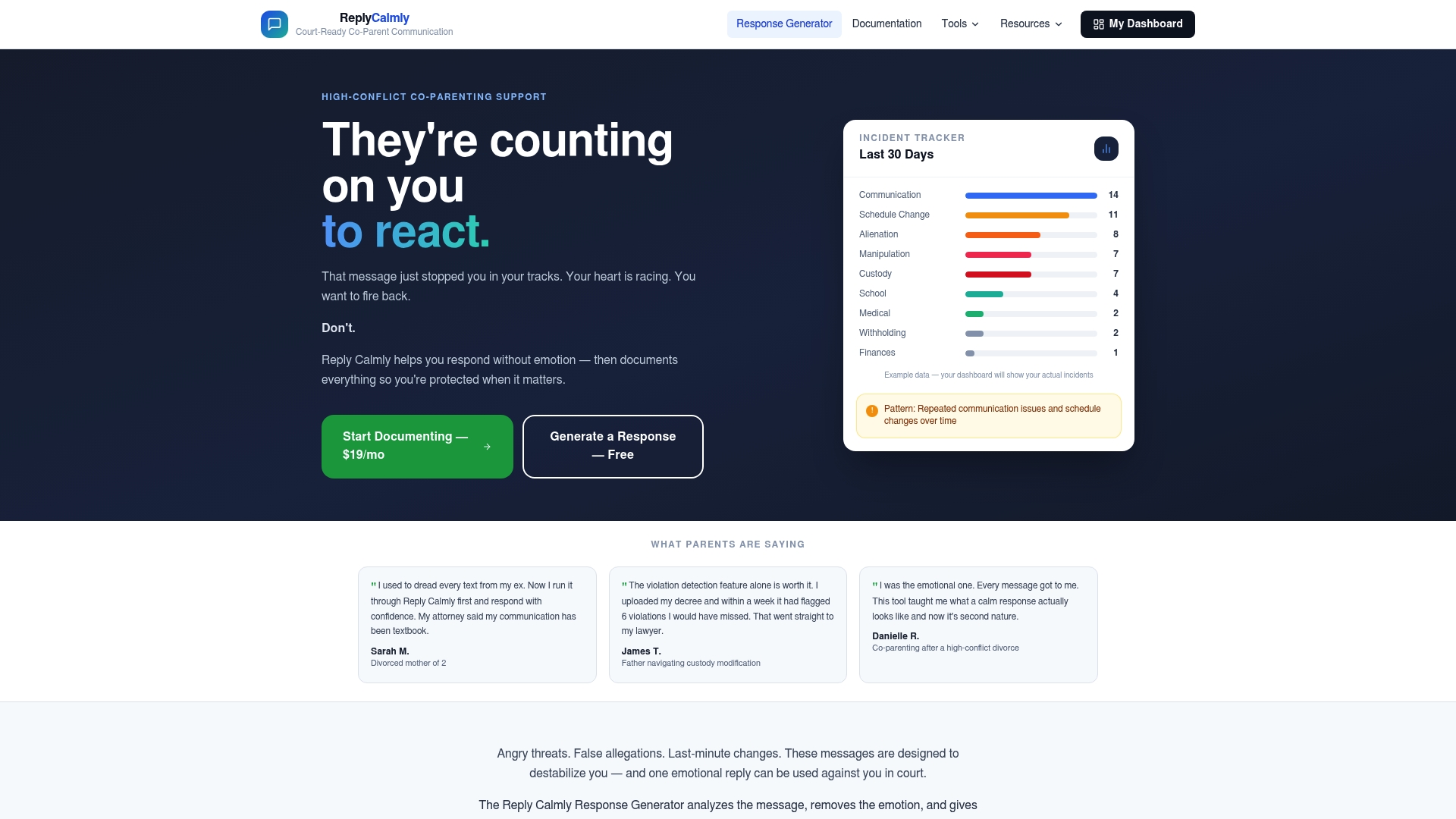
ReplyCalmly provides a lawyer-approved response generator that produces calm, firm, and short reply options while logging incidents into court-ready formats. The platform also detects violations against custody orders and creates PDFs you can use in hearings.
Core Features
ReplyCalmly pairs a multi-tone response generator with structured documentation and analysis tools.
- Incident logging with evidence storage and categories such as custody conflicts, manipulation, and false accusations.
- Violation detection that checks messages against uploaded decrees and highlights potential breaches.
- Court-ready PDF reports plus dashboards that visualize patterns over time.
- Extras include custody schedule generators, a child support calculator, and plain-language guides for co-parenting communication.
Key Differentiator
It combines AI-generated, court-safe responses with continuous incident logging and automated violation detection, then packages that record in court-ready reports. That tight loop from response to documented evidence is the specific capability that separates it from general messaging apps.
Pros
- Parents under pressure get immediate, lawyer-reviewed reply options so they can answer without escalating. Drafting time drops and tone stays consistent.
- The incident log stores messages, uploads, and timestamps in one place, making it easier to assemble evidence for hearings or modification requests.
- Violation detection flags messages against your uploaded divorce decree, reducing manual review when you suspect order breaches.
- Dashboards and PDF reports turn repeated incidents into visual patterns you can present to a lawyer or a judge.
- Designed for non-lawyers: the interface and guides help you organize records without legal training, which saves time compared with piecing together emails and screenshots.
Cons
- Does not provide legal representation or formal legal advice; users should still consult an attorney for strategy and court filings.
Who It's For
Parents engaged in high-conflict custody situations who need a defensible communication record and tone-managed replies. It fits users preparing evidence for hearings or modification petitions and those ordered to use court-mandated tools but wanting richer documentation.
Unique Value Proposition
The response generator returns multiple lawyer-approved tones on demand. Having ready-made, court-safe replies plus an automated incident trail changes how you document and react. Instead of improvising messages and saving screenshots, you generate replies and preserve every interaction in a single, exportable record.
Real World Use Case
A parent receives repeated late pickup complaints and hostile texts. They upload their decree, use the generator to reply calmly, log each message and relevant photos, and run a violation check. At filing time they export a PDF timeline that clearly links conduct to custody clauses.
Pricing
ReplyCalmly offers a Free Forever plan for immediate responses and a paid tier called Full Protection at $19 per month. The paid plan is cancel-anytime and includes exportable data and the full suite of logging, detection, and report features.
Website: https://replycalmly.com
AppClose

At a Glance
The vendor reports more than 2.4 million downloads since 2016, and its marketing materials advertise over 57,000 five-star reviews and court recommendations. AppClose positions itself for families and practitioners who need records that hold up in court.
Core Features
- Secure, court-recommended messaging that logs timestamps and preserves conversation chains for export.
- Shared, customizable parenting calendars and schedule management with change history.
- Legal tools for certified record export and documentation tailored for family law use.
- Video and audio calling with documentation and transcription for later reference.
- Expense tracking plus integrated payments through ipayou®.
Key Differentiator
AppClose focuses on producing court-admissible records and certified exports, a design choice aimed at family law workflows rather than generic messaging. That emphasis makes the app useful when you need a defensible paper trail for hearings and filings.
Pros
- Widely used. The marketing claim above about downloads and five-star reviews suggests broad adoption, which helps when courts and professionals already recognize the app.
- The certified export feature streamlines creating a court-ready packet without manual screenshots or piecemeal logs.
- Built-in expense tracking and payment support reduce back-and-forth over reimbursements and create a clear financial record.
- Mobile and web access means you can log messages, schedules, and incidents from a phone at a pickup line or from a desktop at the lawyer’s office.
- Discounts and free accounts for qualifying users, including military families and domestic violence survivors, lower barriers for people who need it most.
Cons
- Multiple reviewers report intermittent reliability problems with messaging and media features, including dropped calls and failed uploads.
- Several users have needed to reinstall the app to resolve issues, which interrupts continuity of records and adds friction during disputes.
- Feature consistency varies across platforms in third-party reviews, which can complicate court submissions if an export differs from expected layouts.
When It May Not Fit
If you rely on flawless, always-on real time calling and video across devices, AppClose’s reported reliability issues make it a risky sole channel. Teams that need guaranteed uptime for heavy media or integration with other case management systems should look elsewhere.
Notable Integrations
- ipayou® payment system for reimbursements and tracked transactions.
Who It's For
Parents managing shared custody, family law professionals, and military families who need a record-minded app for exchanges, documentation, and court preparation. Best for users who prioritize legal admissibility over advanced collaboration features.
Real World Use Case
A parent logs custody exchanges, records an expense, and saves a transcribed call after a pickup dispute. They export the full message thread and payment history, hand the certified files to their attorney, and submit the packet to the court as evidence.
Pricing
Paid plans start at $8.99/month with a discounted web rate of $7.99/month. The vendor also offers free accounts and fee waivers for qualifying users, including survivors and those granted court-ordered fee relief.
Website: https://appclose.com
2houses
At a Glance
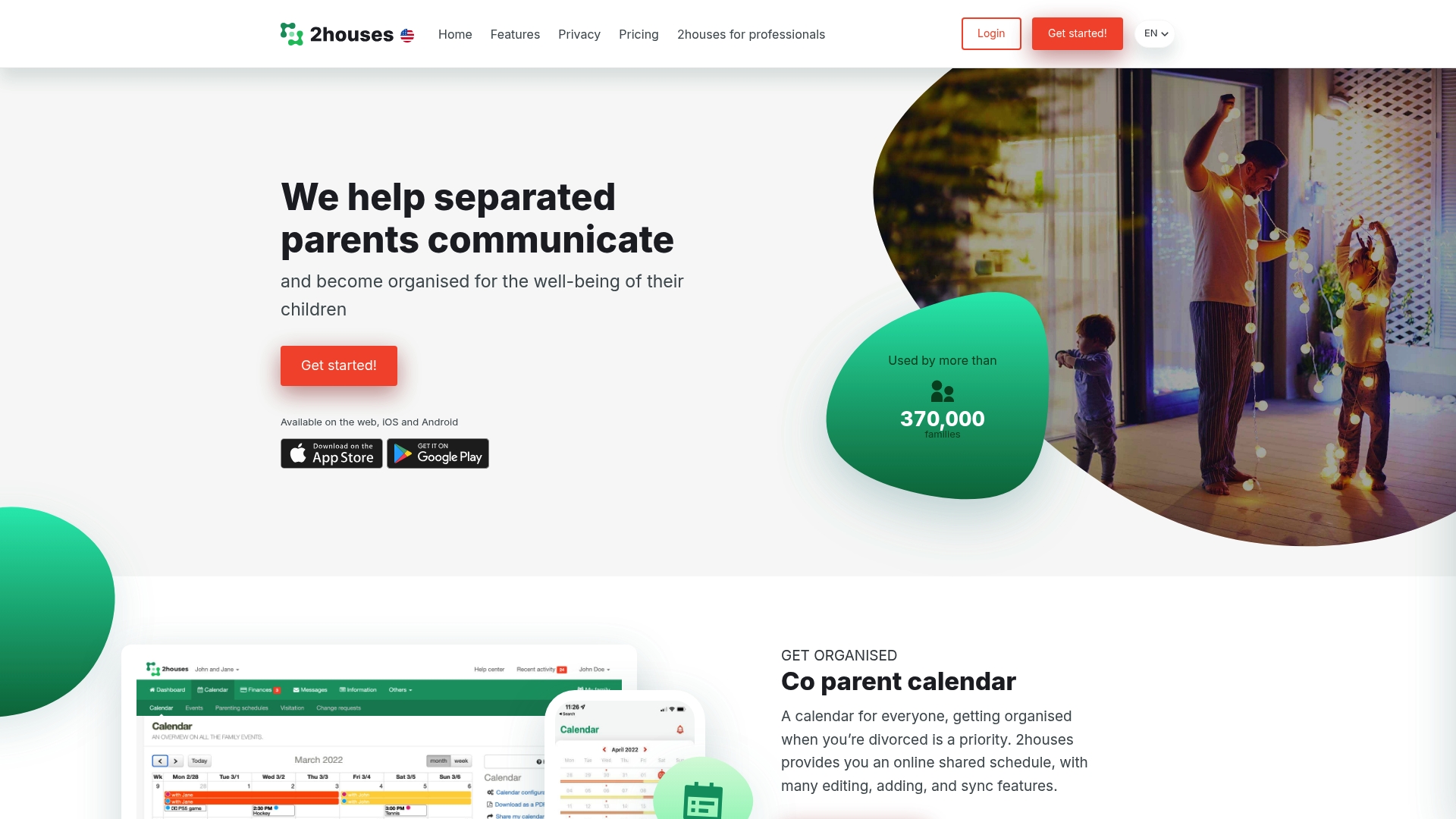
The vendor advertises a 14-day free trial that lets you test scheduling, messaging, and expense tracking before subscribing. 2houses combines a shared calendar, expense management, custody journal, secure messaging, and an information bank across web, iOS, and Android.
Core Features
- Shared co-parent calendar with scheduling, change requests, and syncing to personal calendars.
- Expense management for logging contributions, attaching receipts, and sharing cost breakdowns.
- Secure messaging that keeps conversation and documents in one thread for each child or topic.
- Custody journal for updates, photos, quotes, and milestone notes.
- Information bank for medical records, contact lists, clothing sizes, and allergies.
Key Differentiator
2houses targets the daily coordination of co-parenting by combining scheduling, costs, and a shared record in one place. Replycalmly focuses instead on crafting calm, court-appropriate replies and on incident tracking, so 2houses serves hands-on logistics more directly than response coaching.
Pros
- The feature mix aligns with everyday needs: calendar, expense logs, journal entries, and a dedicated info vault make routine coordination easier.
- Works across web, iOS, Android, so both parents can access the same records from phone or browser.
- The trial mentioned above provides a short window to confirm whether the calendar and expense flows fit your family routines.
- The custody journal and attached media let caregivers share context quickly without long message chains.
- Use cases include mediators and grandparents as stakeholders, so the platform supports more than just the two primary parents.
Cons
- The vendor lists subscription pricing of $14.17/month or $169.99 billed annually, which some families will view as a moderate recurring cost.
- There are few independent third-party reviews publicly available to evaluate long term reliability.
- The system only helps if both parents actively use it; if one party refuses participation the tool’s effectiveness drops.
When It May Not Fit
If one parent will not engage with digital tools, 2houses will add tasks without solving communication gaps. Also choose Replycalmly instead if your priority is generating court-ready, calm message drafts and visual incident logs rather than day-to-day schedule and expense coordination.
Who It's For
Separated parents, guardians, family mediators, and professionals who need a single place to coordinate custody schedules, track shared costs, and keep practical child information organized. It fits households that value consistent record keeping and shared calendars.
Real World Use Case
A divorced couple uses 2houses to post the custody calendar, submit a change request, attach a daycare receipt to a shared expense item, and add a quick journal entry when a child has a school award. Everything stays in one place so follow up is simpler.
Website: https://2houses.com
Choosing Effective Co-Parenting Communication Tools
Deciding on the most suitable co-parenting software involves assessing various aspects crucial to maintaining communication and documentation during custody arrangements.
Unique Communication Frameworks
ReplyCalmly and AppClose diverge significantly in their approach to managing co-parenting communication. ReplyCalmly stands out for its AI-powered, tone-managed reply generator combined with automated violation detection and incident logging. These features equip parents for legal preparation, integrating day-to-day communication with formal evidence documentation. Conversely, AppClose's emphasis on secure conversation logging and court-admissible export packets provides strong support for those prioritizing certified records over automated response generation.
Practical Workflow Features
All reviewed applications incorporate features useful for co-parenting, such as shared calendars and expense tracking. However, 2houses distinctly targets logistical coordination through its depth of calendar tools and custody journal, enabling families to manage schedules and expenses proactively. By incorporating mechanisms for resolving financial splits and centralized child-related information storage, it appeals to families whose primary focus resides beyond the immediate nuances of reply creation and legal case strategy.
Best Fit Scenarios
- ReplyCalmly: Best for parents under legal scrutiny needing fortified communication structures paired with defensible documentation.
- AppClose: Serves those seeking economical options for records admissible in court, appealing to military families or individuals granted fee waivers.
- 2houses: Suited for families prioritizing practical daily logistics, including custody schedules and expense tracking.
Our Pick
ReplyCalmly emerges as the choice for individuals requiring calm, structured message generation alongside automated incident logging tailored for legal commitments. While AppClose provides reliability in court-admissible conversation records, ReplyCalmly's focus on response tone moderation and integrated violation analysis may better suit those managing high-conflict custody arrangements. However, families focusing entirely on routine expense splitting and calendar coordination without engaging in tone-sensitive communication may find 2houses a simpler, more intuitive option.
Co-Parenting Communication Software Comparison
Identifying the ideal platform for managing custody communication records requires a focus on tools that automate documentation and streamline replies.
| Product | Core Feature | Key Differentiator | Best For | Pricing | Notable Limitation |
|---|---|---|---|---|---|
| ReplyCalmly | Lawyer-approved response generator | Incident logging with violation detection | Parents in high-conflict custody situations | Free Forever $19/month | Does not provide legal representation or advice |
| AppClose | Secure court-recommended messaging | Certified court-admissible record exports | Parents prioritizing legal admissibility | $8.99/month | Reported intermittent reliability issues |
| 2houses | Shared co-parent calendar | Comprehensive scheduling and expense tracking | Separated families emphasizing day-to-day coordination | $14.17/month $169.99/year | Requires mutual adoption by both parents |
Discover a Smarter Way to Manage High-Conflict Co-Parenting Communications
If you are exploring coparentpro.app alternatives to find tools that help you respond calmly and keep a solid record for custody and family court matters then Replycalmly offers an ideal solution. This platform addresses common pain points like crafting lawyer-approved responses, tracking incidents of custody conflicts or manipulative behavior, and generating court-ready reports that make legal preparation less overwhelming. With Replycalmly you can reduce stress by sending measured messages while building a trustworthy evidence trail.

Take control now by visiting ReplyCalmly.com to try the response generator and incident logging features. Start organizing your communication and building your case effortlessly so when you need to present proof or respond calmly you have trusted tools waiting.
Frequently Asked Questions
How does ReplyCalmly assist with documenting parenting incidents?
ReplyCalmly allows parents to log incidents, including evidence storage and categories like custody conflicts and false accusations. The incident log feature organizes messages, uploads, and timestamps in one place, making it easier to assemble evidence for hearings or modification requests. Consider using this tool for a streamlined approach to documenting custody situations.
What is the difference between ReplyCalmly and AppClose regarding messaging?
AppClose offers secure, court-recommended messaging that logs timestamps and preserves conversation chains for export. In contrast, ReplyCalmly's strength lies in generating calm, lawyer-reviewed reply options for high-conflict communications, making it the better fit for instances where tone management is crucial. Choose ReplyCalmly if you need to craft responses while simultaneously logging incidents.
Which platform provides a child support calculator?
ReplyCalmly includes a child support calculator as one of its features. This tool helps parents precisely assess support obligations while also permitting incident logging and violation detection through its comprehensive platform. Use ReplyCalmly to get a multi-dimensional tool that assists both in communication and financial management.
Can I use AppClose if I need a dedicated expense tracking feature?
AppClose includes built-in expense tracking and integrated payments to clarify financial records between co-parents. While ReplyCalmly does not focus primarily on expense management, it excels in generating court-safe replies and tracking communications. If financial tracking is a priority, AppClose might suit you better, but consider ReplyCalmly for communication-focused needs.
Does 2houses support shared calendars for co-parenting?
Yes, 2houses features a shared co-parent calendar with scheduling and change requests. This centralizes day-to-day coordination, whereas ReplyCalmly's primary task is creating lawyer-approved responses and logging incidents instead of managing everyday schedules. If you need a calendar-centric solution, 2houses is worth considering alongside ReplyCalmly for communication.