
A medical appointment notice is a short, factual message telling the other parent about a child's upcoming medical visit, and it needs to be saved somewhere it can't be edited or lost. It should name the child, spell out the date, time, and location, name the provider and the reason for the visit, flag any consent that's needed, and note any change to pickup or drop-off. HHS treats medical records as neutral evidence in custody disputes, which is exactly why the notice itself needs to hold up the same way.
Here's a sample you can adapt right now:
Pro Tip: Send it by email or through your court-mandated app rather than a text you might delete by accident. Screenshot it too, as a backup, but keep the original.
Key Takeaways
A court-appropriate medical appointment notice works only when it pairs complete factual details with a preservation method that produces its own timestamp.
| Point | Details |
|---|---|
| Include the right fields | List child identifiers, appointment specifics, purpose, consent needs, and any logistics changes every time. |
| Choose channels with metadata | Email, court apps, and certified mail beat texts because they generate independent timestamps. |
| Know your legal baseline | Parents generally retain access rights under HIPAA unless a court order or state exception applies. |
| Document refusals, don't argue | Save every unanswered notice and switch to short factual follow-ups instead of debate. |
| Use a tool built for this | Replycalmly's generator and tracker create calm, timestamped notices and exportable records for court. |
This article is general information, not a substitute for advice from a qualified lawyer. Consult a qualified legal professional about your own circumstances before acting on anything here.
Table of Contents
- What Information Belongs in a Medical Appointment Notice?
- How Do You Send and Document a Notice So It Holds Up in Court?
- What Should a Medical Appointment Notice Actually Say?
- What Are the Legal Limits on Parental Access to Medical Records?
- What If the Other Parent Refuses to Acknowledge the Notice?
- How Do You Organize Notices Into Court-Ready Records?
- When Should You Call an Attorney Instead of Handling This Yourself?
- What We've Learned From Watching Co-Parents Handle This
- How ReplyCalmly Helps You Send and Track Every Notice
- Sources
What Information Belongs in a Medical Appointment Notice?
A notice that skips details invites a "you never told me" dispute later. Every version should include the following:
- Child identifier: full name and date of birth or age, plus your relationship (parent or guardian).
- Appointment specifics: exact date, start time, an estimated end time or window, provider's full name, clinic address, and phone number.
- Purpose of the visit: routine checkup, immunization, therapy, specialist consult, whichever it is, stated plainly.
- Consent or authorization needs: say clearly whether you need the other parent's sign-off for a procedure or if this is purely informational.
- Logistics changes: who is driving, whether pickup or drop-off times shift, and who plans to attend.
- A record-keeping line: something like "I'm saving this message as part of our communication record," which signals intent without sounding combative.
For anything beyond a routine checkup, send the notice with more lead time. Absent a court order specifying a window, a good default is 48 to 72 hours for routine care and as much notice as possible for anything scheduled further out, like a specialist referral.
Pro Tip: If your parenting plan already sets a notice period, quote it back in the message ("per our order, giving 72 hours' notice") — it shows you're following the plan, not just being polite.
How Do You Send and Document a Notice So It Holds Up in Court?
The method you use to send a notice matters almost as much as what it says. Courts weigh evidence differently depending on whether it comes with a timestamp, a header, or just your word.
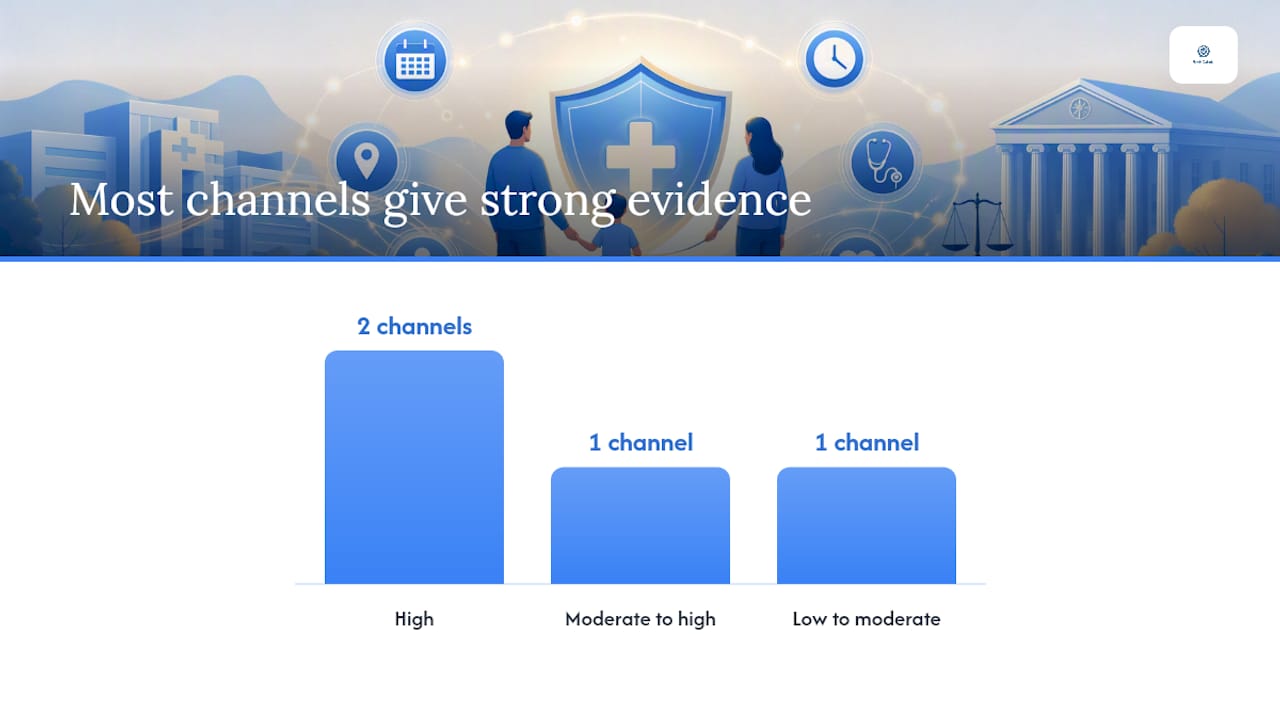
Court portals, when your order requires one, come first. After that, email with read receipts, a court-approved co-parenting app, or certified mail with a return receipt all work well because each generates its own timestamp independent of you. A plain text message can work in low-conflict situations, but it's the weakest option if things escalate, since texts are easy to delete and harder to authenticate.
Once you've sent it, back it up. Export the full thread rather than a single message, keep original email headers instead of just the visible text, and store a copy in two separate places, like a cloud drive and a labeled folder on your own device. Custody-documentation guides consistently recommend preserving native files over screenshots, because a native export carries metadata a cropped image simply can't.
| Channel | Evidence strength | Metadata available | Best for |
|---|---|---|---|
| Court-approved app | High | Timestamps, custodian export | Ongoing high-conflict cases |
| Email with read receipt | High | Full headers, send/read times | Routine and urgent notices alike |
| Certified mail | Moderate to high | Return receipt, postal record | Formal or disputed situations |
| SMS/text | Low to moderate | Limited, easy to delete | Low-conflict, informal updates only |
Avoid cropped screenshots with no visible header, deleting earlier messages in a thread, or relying on a verbal heads-up with nothing written down.
Pro Tip: If you notify by phone, write a summary immediately afterward, noting date, time, and what was said. Skip recording the call unless you've confirmed your state allows it, since consent laws vary widely.
What Should a Medical Appointment Notice Actually Say?
Wording changes depending on how much conflict you're navigating and what kind of appointment it is. Three tones cover most situations.
That's the calm version, useful whenever conflict is low and you just want a clean paper trail.
The firm version adds structure for a parent who's ignored notices before: "Per our parenting plan, I'm giving 72 hours' notice of [Child]'s specialist appointment on [date] at [time] at [location]. Please confirm receipt by [date/time]. If I don't hear back, I'll proceed as the sole point of contact for this visit and document accordingly." No threats, no emotional language, just facts and a stated next step.
The short version fits low-stakes updates: "Update: [Child] has a dentist appointment Tuesday at 10 AM, no changes to pickup."
Therapy and mental-health appointments deserve extra care. Confidentiality rules for minors can limit what a provider shares even with a parent, so keep your notice to logistics rather than clinical detail. Vaccination and routine-care notices can stay short. Specialist or surgical appointments warrant the firm template, since consent and timing tend to matter more.
If you'd rather not draft from scratch every time, a prebuilt response generator can produce calm, firm, or short variations in seconds, which helps when you're already stressed and don't want tone to become the next argument.
What Are the Legal Limits on Parental Access to Medical Records?
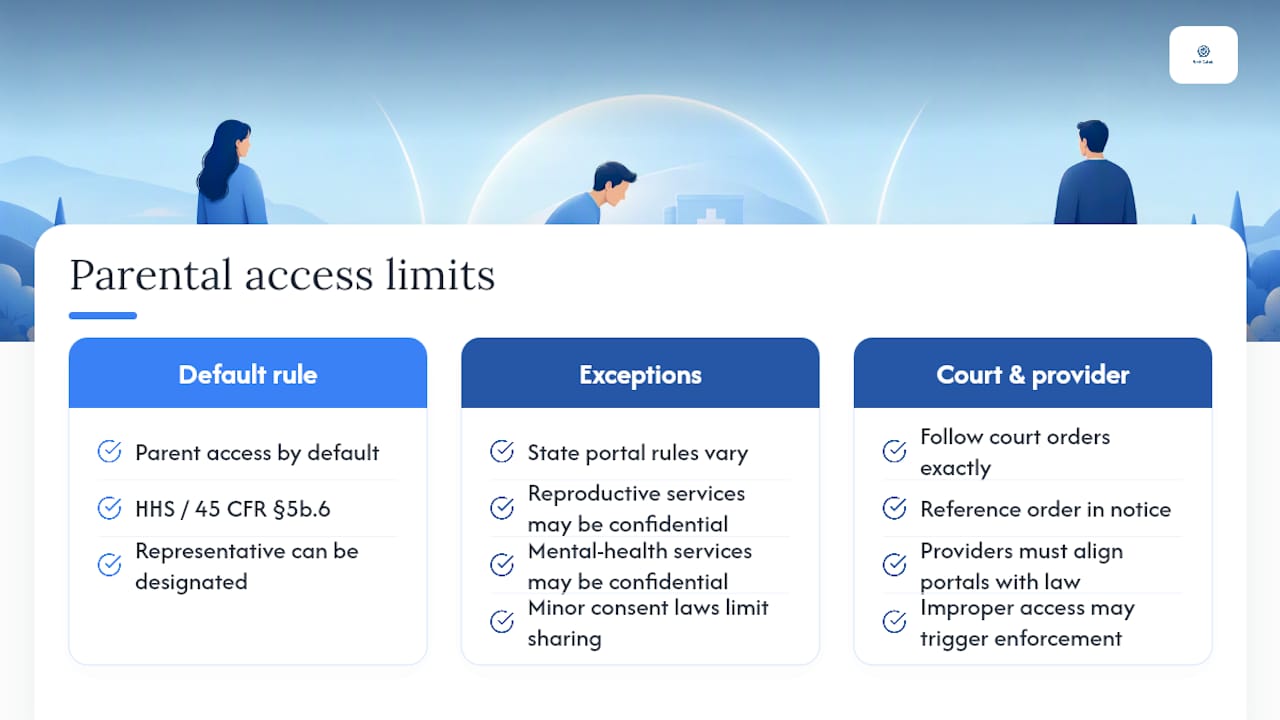
Most parents keep the right to access an unemancipated child's medical information and make health decisions unless a court order says otherwise. HHS has reaffirmed that this baseline holds even in contested custody situations, and federal rules under 45 CFR § 5b.6 spell out notification procedures and how a representative can be designated to receive records.
That baseline isn't absolute. States vary on how they apply parental access rules to electronic portals, and some services (like certain reproductive or mental health treatment for older minors) carry confidentiality protections that limit what any parent sees, regardless of custody status. Recent OCR and HHS guidance has pushed providers to align portal settings with both HIPAA and state law, since blocking a parent improperly can trigger enforcement action just as wrongly granting access can.
If a court order restricts one parent's medical decision-making or access, follow that order exactly and reference it in your notice ("per our custody order, informational notice only, no consent authority").
One detail worth flagging: age-specific consent laws in many states let minors, typically teenagers, consent to certain services without parental notification at all. When that applies, your notice may need to stay limited to scheduling logistics rather than clinical specifics, since the provider may not be able to share more with you either.
What If the Other Parent Refuses to Acknowledge the Notice?
Don't escalate the tone, escalate the paper trail. Save every message, screenshot, and mail receipt tied to the refusal, including timestamps.
- Keep sending required notices on schedule, even if you get no response.
- Switch from arguing to documenting: one brief factual follow-up, no back-and-forth.
- Ask for a simple confirmation each time, so a later claim of "I was never told" doesn't hold up.
Pro Tip: A neutral, boring message is more persuasive in court than an emotional one. Save your reaction for a private journal, not the co-parent thread.
If refusals continue, an attorney can advise on filing a motion to enforce the existing order or, in urgent situations, seeking emergency relief.
How Do You Organize Notices Into Court-Ready Records?
Build a simple index: date, time, channel used, one-line summary, and where the file lives. That's your master log, and it turns a folder of screenshots into something an attorney can actually use.
Export native files whenever you can, an email's original .eml file beats a screenshot every time, and keep an untouched original alongside any working copy you annotate. Note who has access to your backups and where they're stored; that chain-of-custody detail matters if authenticity ever gets challenged. Documentation guides generally recommend keeping records for the life of the custody order, longer if litigation is active, with copies in at least two separate locations.
Pro Tip: Before a hearing, build a one-page summary of your five or six most relevant notices for your attorney. Judges and lawyers move faster with a highlight reel than a hundred-message thread.
When Should You Call an Attorney Instead of Handling This Yourself?
Some situations need more than good documentation. Bring in a lawyer or ask the court to step in when:
- The other parent repeatedly ignores or violates notice requirements in your order.
- A provider or the other parent blocks access to medical information you're entitled to.
- A medical emergency is being obstructed, or a child's safety is genuinely at risk.
- You need a formal enforcement motion, a temporary order on decision-making, or an evidentiary hearing.
What We've Learned From Watching Co-Parents Handle This
Most conflict over medical notices doesn't come from bad intentions. It comes from vague wording, no timestamp, and a reply sent in anger that the other side later uses. Keep notices boring on purpose. The pitfall we see most is over-explaining, sharing therapy notes or diagnosis details nobody asked for, or worse, editing a message after the fact to soften something you regret sending. Never edit; if you need to correct information, send a new dated message instead. When things are calm, coordinate ahead of time. When they're not, document everything and say less.
How ReplyCalmly Helps You Send and Track Every Notice
Replycalmly turns the process above into something you don't have to build from scratch every time. The response generator produces calm, firm, or short versions of a medical notice in seconds, so tone never becomes the argument. The incident tracker logs each notice with a timestamp, tags it by category, and lets you attach supporting files, building the exact chronological record courts want to see. When it's time to hand something to your attorney, the export function generates a report instead of a scramble through old texts.

None of this replaces a court-mandated app like OurFamilyWizard where one is required, and it isn't legal advice. It's a layer that sits alongside those tools and helps you stay organized between hearings. If you're currently piecing together screenshots from three different apps, start with the documentation-focused co-parenting tools comparison to see which workflow fits your situation, then try the response generator on your next notice.
Sources
- HHS protects parents’ rights in children’s health decisions
- 45 CFR § 5b.6 — Notification of or access to medical records
- How to Document Co-Parenting Communication for Court - Co-Parenting Guide
- How to Document Everything in a High-Conflict Custody Case — The Complete System | Carl Knickerbocker Law