
When you're in the middle of a high-conflict custody situation, every text message, missed pickup, and hostile email feels like it could matter in court. The problem is, most parents don't realize how quickly disorganized evidence becomes useless evidence. A screenshot buried in your camera roll or a verbal argument you "meant to write down" won't protect you when your attorney needs specifics. This guide walks you through a practical, step-by-step system for collecting, organizing, and presenting co-parenting evidence, so you can stay protected, stay calm, and let the facts speak for themselves.
Table of Contents
- Understanding the importance of co-parenting evidence
- Gathering the right tools and materials
- Step-by-step system for organizing co-parenting communications
- Avoiding common mistakes and strengthening your evidence
- Verifying your evidence for court and professionals
- What most guides miss about co-parenting evidence
- Organize communication with ReplyCalmly's expert tools
- Frequently asked questions
Key Takeaways
| Point | Details |
|---|---|
| Never alter messages | Always keep original, time-stamped emails and texts for legal credibility. |
| Use documentation apps | Select tools that log, organize, and tone-check communications to simplify evidence gathering. |
| Organize by date and topic | Use folders and logs to make court-ready documentation easy to retrieve and understand. |
| Respond calmly and factually | Structure replies using apps and templates to avoid escalation and strengthen your records. |
| Verify before submission | Double-check your evidence with your lawyer or trusted advisor before court presentation. |
Understanding the importance of co-parenting evidence
Let's be direct: in custody disputes, if it isn't documented, it effectively didn't happen. That's not just a saying. As legal documentation principles make clear, judges and family law attorneys rely almost entirely on written, verifiable records when making decisions about parenting time and child welfare. Your memory, no matter how clear, is not evidence.
Strong documentation protects you in two major ways. First, it gives your attorney concrete material to work with. Second, it shields you from false allegations. If your co-parent claims you never responded to a pickup request, a time-stamped message thread is your defense. If they accuse you of harassment, a calm, factual paper trail tells the real story.
"The strongest evidence in high-conflict custody cases is unedited, time-stamped, and contextual. Courts look for patterns, not isolated incidents."
What counts as usable evidence? Focus on these core types:
- Text messages and emails with visible timestamps and sender information
- Read receipts that confirm a message was received
- Communication logs that record patterns of behavior over time
- App-based records that automatically store and date-stamp interactions
- Screenshots that capture the full conversation thread, not just one line
As one widely-shared firsthand account explains, you should screenshot with timestamps and never edit or delete anything, because courts read the full context, not just the message that upset you.
Good documentation is also about your own clarity. When you're documenting co-parenting issues consistently, you stop second-guessing yourself. You have facts. That mental stability matters enormously during a stressful legal process.
With the stakes clear, let's move into what you'll need to organize your evidence effectively.
Gathering the right tools and materials
You don't need an expensive legal team to get organized. What you need are the right tools, used consistently.
Apps built for co-parent communication are your first priority. Court-mandated communication platforms like OurFamilyWizard (OFW) include features like ToneMeter, which flags escalatory language before you send a message, and integrates with the BIFF method (Brief, Informative, Friendly, Firm) to help you structure de-escalating responses. These tools don't just record, they actively help you communicate more safely.
Beyond court-mandated tools, co-parenting apps for documentation range from basic message loggers to full-featured evidence trackers with pattern dashboards. Virtual assistants and apps used in family law are increasingly being adopted to help parents and attorneys manage large volumes of communication records.
Here's a comparison of your main options:
| Feature | Manual logs | Dedicated co-parenting apps |
|---|---|---|
| Timestamping | Manual, error-prone | Automatic |
| Read receipts | Not available | Built-in on most platforms |
| Export for court | PDF or paper only | PDF, CSV, or direct export |
| Tone checking | None | Available on select apps |
| Pattern tracking | Limited | Dashboard visualization |
| Cost | Free | Subscription-based |
You'll also want a documentation template for court to standardize how you record incidents. Templates help you capture the same data points every time: date, time, what was said, what you did in response, and any relevant outcome. Consistency is what makes your records credible.
Key features to look for in any tool you use:
- Automatic timestamping on every message or entry
- Export options (PDF or screenshot) for attorney review
- Read receipt tracking to confirm message delivery and viewing
- Incident categorization so you can organize by type (custody conflict, false accusation, missed visitation)
- Secure cloud storage that can't be altered after the fact
Pro Tip: If you're using a platform like OurFamilyWizard because a court requires it, you can still use a supplemental tool like ReplyCalmly alongside it to draft responses and track patterns. These tools complement each other rather than conflict.
Step-by-step system for organizing co-parenting communications
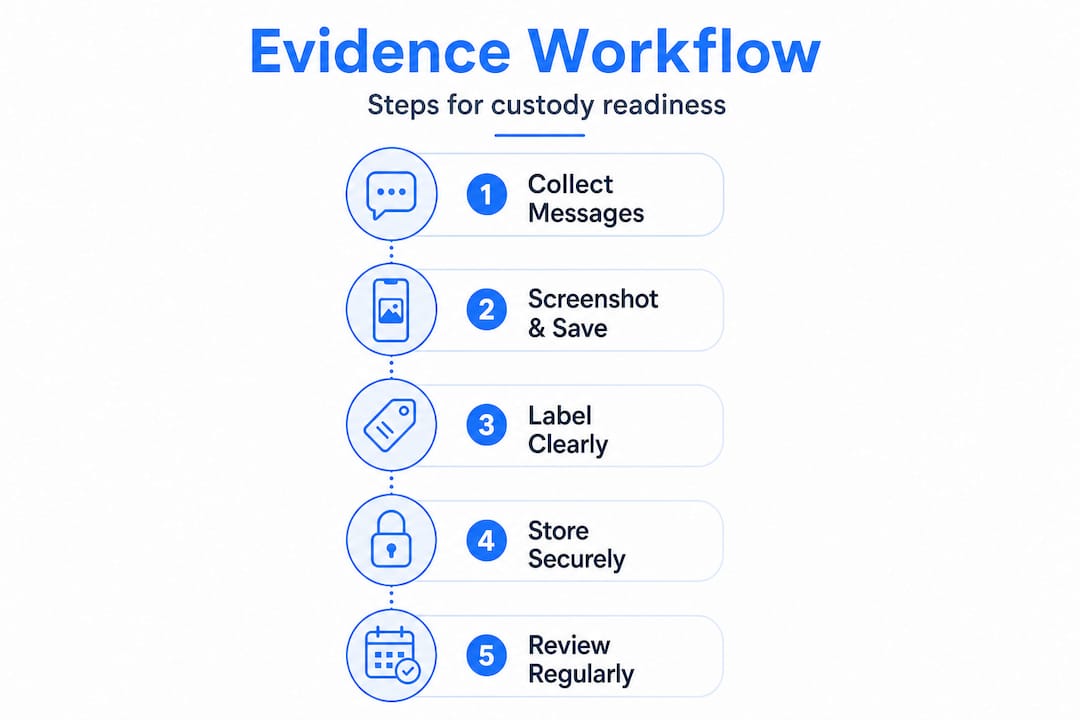
Having the right tools only matters if you use them systematically. Here's a clear sequence to follow from the moment you receive a difficult message.
- Capture it immediately. The moment a concerning message arrives, take a full screenshot that includes the sender's name, the date and time, and the full message. Don't crop or edit anything.
- Save to a dedicated folder. Create a folder system organized by month and topic. For example: "2026-01 Custody Pickup Issues" or "2026-03 False Allegations." This makes retrieval fast when your attorney needs specific records.
- Log the incident. Open your incident log and record the date, the platform the message came through, a brief description of the content, your response (or that you chose not to respond), and any outcome.
- Draft a calm response. Before you send anything back, review your reply for emotional language. Use a tone-checking tool or a structured template to keep it factual and brief.
- Capture your response and their reply. Document your outgoing message the same way you documented theirs. If they reply, screenshot that too.
- Back up everything. Weekly, back up all screenshots and logs to a cloud service or a secure external drive. Don't rely solely on your phone.
Your tracking evidence log should look something like this:
| Date | Platform | Issue type | Summary | Your response | Outcome |
|---|---|---|---|---|---|
| Jan 5, 2026 | Text | Pickup conflict | Co-parent refused agreed pickup time | Sent documented request | No change, court informed |
| Jan 12, 2026 | False accusation | Claimed I missed a school event | Replied with photo/timestamp proof | Acknowledged by attorney | |
| Jan 20, 2026 | OFW | Schedule change | Requested holiday swap | Agreed in writing through app | Logged and stored |
The incident logging guide breaks down each of these fields in more detail, including how to note your emotional state separately from the legal record (your feelings matter for context, but the legal log should stay objective).
Pro Tip: Use a consistent file naming format like "YYYY-MM-DD_IssueTopic" for every screenshot you save. This makes sorting automatic and prevents files from getting mixed up across months.
As that firsthand case documentation guide emphasizes, never delete original messages, even ones that seem minor at the time. Courts look for patterns over months, not just single incidents.
Avoiding common mistakes and strengthening your evidence
Even parents who are trying to do everything right make documentation errors that weaken their case. Here are the most damaging ones, and how to avoid them.
Editing or deleting messages. This is the single biggest mistake. If you delete a message because it made you look bad or because you thought it wasn't relevant, you risk destroying your own credibility. Courts prefer untouched, time-stamped records. If something exists, keep it. Your attorney can help you contextualize it.

Responding emotionally. A furious reply might feel satisfying in the moment, but it becomes part of your record too. If a judge reads a thread where your co-parent is hostile and you escalated back, that hurts your case. Emotional tone is something courts notice. The role of message logs in rebuilding credibility applies here: consistent, calm responses build trust in your account over time.
Common mistakes to avoid:
- Selective documentation. Only saving messages that support your side looks manipulative. Save everything.
- Missing timestamps. Screenshots without visible dates are easy to dispute. Always capture the full screen.
- Vague log entries. "She was rude again" is not a log entry. Specific quotes, dates, and outcomes are.
- Responding without a record. If you call instead of text, the conversation disappears. Keep communication written whenever possible.
- Losing read receipts. If your messaging app shows read receipts, capture them. They prove the other party saw your message.
Pro Tip: Before responding to any heated message, use a court-safe email response example as a template. Starting from a calm, pre-structured format makes it much harder to accidentally escalate.
Verifying your evidence for court and professionals
Before you hand anything over to your attorney, you need to verify that your documentation is complete, clean, and easy to navigate. A disorganized pile of screenshots is much harder to use than a well-structured evidence package.
Work through this checklist before any legal review:
- Check for date gaps. Review your log and look for periods where no incidents were recorded. If something happened during that time, add a note. If nothing happened, that's useful context too.
- Confirm file formats. PDFs and full-page screenshots are the most attorney-friendly formats. Avoid low-resolution images or files that don't clearly display sender information.
- Verify all logs match screenshots. Every entry in your incident log should correspond to a saved screenshot or exported record. No orphaned entries, no missing files.
- Make sure files are accessible. Store everything in a location you can access from your phone, computer, and ideally share with your attorney securely. Google Drive or a secure folder-sharing service works well.
- Have your attorney review a sample. Before you submit anything formally, ask your attorney to look at a few entries and confirm the format works for their process.
"Thorough documentation isn't just about having evidence. It's about presenting it in a way that's clear, consistent, and credible to someone who has never been inside your situation."
This is where a co-parent documentation template pays off. When every entry follows the same structure, your attorney can move through records quickly, pull what they need, and build a stronger case on your behalf. The consistency signals preparation, and preparation signals credibility.
Refer back to the same firsthand guide on preserving full context to confirm you're capturing everything courts actually look for, not just the highlights that support your position.
What most guides miss about co-parenting evidence
Most documentation guides treat evidence as a purely logistical problem. Capture everything, store it safely, hand it over. That's necessary but not sufficient. Here's what we've seen that most articles skip entirely.
Tone matters as much as facts. Judges read communication threads. When they see a parent who responds to provocations with calm, measured language, that parent looks stable. When they see someone who takes the bait every time, that pattern speaks louder than any single incident. Your documentation isn't just a record of what happened. It's a portrait of who you are under pressure.
Evidence is also for your own mental health. When you're in a high-conflict situation, your memory gets distorted by stress. You start to doubt your own recollections. Having a consistent, accurate log to refer back to keeps you grounded. It's easier to stay calm when you know the facts are written down and safe.
Consistency builds legal credibility over time. A single incident, no matter how serious, is harder to act on than a documented pattern of behavior over six months. Judges look for trends. Your job is to make those trends visible and undeniable through clean, consistent records.
Apps are tools, not substitutes for strategy. Using a tone-checking tool or a response generator is genuinely helpful. But it works best when you understand why you're using it. The goal is to show up in your records as the calm, child-focused parent you actually are, and to let your co-parent's communication patterns speak for themselves. Getting co-parenting help isn't about outsourcing your judgment. It's about supporting it.
Organize communication with ReplyCalmly's expert tools
Managing co-parenting evidence shouldn't add more stress to an already overwhelming situation. ReplyCalmly was built specifically for high-conflict co-parents who need a smarter, more organized way to handle difficult communications and build a court-ready record.

The platform's best documentation apps guide helps you find tools that fit your specific custody situation, while the documentation template gives you a ready-to-use format your attorney will appreciate. ReplyCalmly's evidence log tracks incidents by category, visualizes patterns over time, and exports cleanly for legal review. Whether you're just getting organized or preparing for an upcoming hearing, these tools give you the structure and confidence to stay one step ahead.
Frequently asked questions
What counts as valid co-parenting evidence in court?
Screenshots with timestamps of texts and emails, read receipts, and structured incident logs are all valid evidence, provided they are unedited and contextually complete.
Should I respond to escalatory messages from my co-parent?
Yes, but respond calmly and factually. Tools like OurFamilyWizard's ToneMeter feature can flag inflammatory language before you send, helping you avoid responses that escalate the situation.
How can I organize messages for easy court submission?
Create folders by date and topic, log each incident with consistent fields, and use apps or templates that export clean records in PDF or screenshot format that attorneys can review quickly.
What are the risks of editing or deleting co-parenting messages?
Altering or removing messages can destroy your credibility in court, since judges expect untouched, time-stamped records and may view missing or edited evidence as an attempt to hide the truth.