
A communication log is a structured, chronological record of every interaction between co-parents, built to serve as admissible evidence in custody disputes and family court. For co-parents managing high-conflict situations, the step-by-step communication log process is not optional documentation. It is the difference between a claim you can prove and one a judge dismisses. Tools like Replycalmly, structured templates, and timestamped entries give you a legal-grade record that holds up under scrutiny. This guide walks you through exactly how to build one, what to include, and how to avoid the mistakes that make logs useless in court.
What does a step-by-step communication log process include?
A court-ready communication log is not a folder of screenshots or a stream of forwarded texts. It is a structured record built around consistent, mandatory fields that legal professionals can read and trust. Standardized log entries must include date, time, communication channel, who initiated contact, a factual summary, the outcome, and any next steps with due dates. Consistent fields prevent the log from becoming disorganized and make it directly usable by attorneys and mediators.
Required fields for every log entry
Every single entry in your log needs the same core fields, regardless of how minor the interaction seems. Skipping fields on "small" exchanges creates gaps that opposing counsel will exploit. Here is what each entry must contain:
- Date and time: Use a 24-hour format or include AM/PM clearly. Timestamps are the backbone of any audit trail.
- Communication method: Text, email, phone call, in-person, or app-based (such as OurFamilyWizard).
- Who initiated: You or the other parent. This matters for pattern documentation.
- Participants: Both parties, and any third parties present (teachers, counselors, attorneys).
- Factual summary: What was said or agreed upon, written in neutral, objective language.
- Outcome: What was decided, confirmed, or left unresolved.
- Next steps and due dates: Any follow-up actions and who is responsible for them.
Pro Tip: Write your summary as if a stranger will read it in court. If it contains the word "always," "never," or any emotional interpretation of motive, rewrite it.
Below is a simple template structure you can replicate in a spreadsheet or documentation app:
| Field | Example entry |
|---|---|
| Date and time | 2026-03-14, 7:42 PM |
| Method | Text message |
| Initiated by | Other parent |
| Participants | Both parents |
| Summary | Other parent requested schedule change for March 20. No agreement reached. |
| Outcome | Unresolved. Follow-up expected. |
| Next step | Written response due by March 15. |
Neutral, objective tone is not just a stylistic preference. Facts are harder to dismiss legally than subjective interpretations of motive or tone. Keep every summary to what was said and what was decided, nothing more.
What tools and templates make communication logging easier?
Digital logs beat screenshots every time. Screenshots alone are easily challenged in court and should only serve as supporting evidence referenced within a factual log entry. A centralized, chronological log is far stronger because it shows a continuous, unbroken record rather than isolated moments.
Choosing the right logging system
Your logging system needs three things: consistent structure, easy export, and tamper-evident timestamps. A Google Sheets spreadsheet with locked column headers works for parents just starting out. Dedicated co-parenting documentation apps go further by automating timestamps and organizing entries by category.
Replycalmly offers a tracking system that logs incidents, categorizes issues such as custody conflicts and false accusations, and visualizes patterns through dashboards. This matters because separate incident and communication logs prevent clutter and make behavioral patterns visible over time. Merging incidents and communications in one stream makes it impossible to identify frequency or escalation patterns.
Here is a comparison of common logging approaches:
| Method | Strengths | Weaknesses |
|---|---|---|
| Spreadsheet (Google Sheets) | Free, exportable, customizable | No auto-timestamps, manual entry only |
| Screenshot folder | Easy to capture | Easily challenged, no structure |
| Co-parenting app (e.g., Replycalmly) | Auto-timestamps, pattern tracking, exportable | Requires consistent use |
| Court documentation template | Pre-structured for legal use | Static, no automation |
Pro Tip: Use Replycalmly's co-parenting documentation template as your baseline structure, then export the full log before any court date or mediation session.
A consistent, simple template with required fields maintains clarity and legal strength by avoiding scattered or incomplete notes. Whatever system you choose, the format must stay identical across every entry. Judges and attorneys read patterns. Inconsistency reads as unreliability.
How to log each communication event, step by step
This is the core of the communication documentation process. The steps below apply to every interaction: texts, calls, emails, school pickups, and any exchange that touches custody arrangements.
-
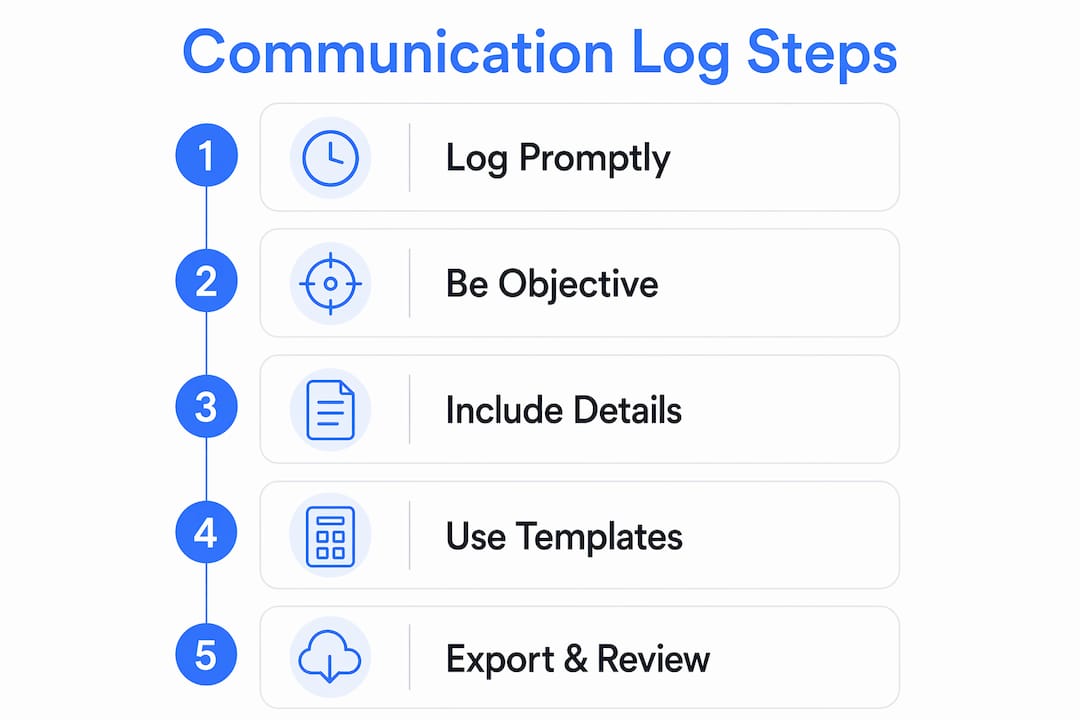
Log within 5 minutes, or no later than 24 hours. Logging interactions immediately prevents memory drift and captures exact timestamps, promises, and tone before details fade. If you cannot log immediately, write a brief note on your phone within five minutes and complete the full entry that evening.
-
Open your log template before you write anything. Do not draft a summary in a notes app and transfer it later. Go directly to your structured log so every field gets filled in the correct format from the start.
-
Record who initiated and how. Note the exact method: a 7:15 PM phone call is different from a 7:15 PM text. Courts look at patterns of contact initiation, especially in harassment or interference claims.
-
Write a factual summary in three to five sentences. Describe what was communicated, not what you felt about it. "Other parent stated they would not return the child by 6 PM on Sunday" is a fact. "Other parent was being difficult again" is an opinion and weakens your log.
-
Confirm verbal agreements in writing within 24 hours. Verbal agreements not followed by written confirmation are legally weak. Send a follow-up message or email that summarizes what was agreed upon. Log that confirmation as a separate entry.
-
Document any missing responses. If you sent a message and received no reply, log the date sent, the content, and the absence of response. Patterns of non-response are relevant evidence in custody cases.
-
Note all next steps and deadlines. Every unresolved item needs a due date and a responsible party. This transforms your log from a passive record into an active accountability tool.
"The greatest value of a communication log emerges at dispute end. Exporting a full, chronological record creates cohesive, provable evidence of reliability." — cleartimeline.com
Pro Tip: After any in-person exchange, send a written summary to the other parent by email or through your co-parenting app. Their silence or agreement both become part of your record.
Understanding the difference between a log and an audit trail sharpens your approach. Audit trails prove responsibility and traceability. A log records activity. An audit trail proves who authorized messages, under what mandate, and with what oversight. Your goal is to build the latter. To succeed in custody cases, you need a record showing who said what, when, and how it fits your custody arrangement. Replycalmly's tracking dashboard is built specifically for this purpose, helping you document communication history in a format courts recognize.

Common mistakes that make communication logs fail in court
Even parents who log consistently make errors that reduce the legal weight of their records. Knowing these pitfalls in advance saves you from discovering them at the worst possible moment.
-
Mixing incidents and communications. An incident is what happened. A communication is the discussion about what happened. Keeping them in the same log makes it impossible to track behavioral patterns or frequency. Use two separate logs or two separate categories within your app.
-
Relying on screenshots as primary evidence. Screenshots can be manipulated and are not accepted as primary evidence by most courts. They belong in a supporting folder, referenced from a factual log entry, not as standalone proof.
-
Delayed entries with reconstructed details. Logging three days after an event introduces memory errors and removes the credibility of your timestamps. Courts notice when entries cluster around filing dates.
-
Opinionated or emotional language. Phrases like "as usual" or "once again proving" signal bias and invite challenges. Every sentence in your log must describe observable facts, not interpretations.
-
Incomplete fields. A log entry missing the communication method or outcome is a gap. Opposing counsel will point to every gap as evidence of carelessness or fabrication.
-
No written follow-up on verbal exchanges. Written confirmation prevents disputes over what was agreed. A response like "confirmed, pickup at 6 PM Saturday" creates a paper trail that a verbal conversation never can.
-
Failing to export and back up regularly. Your log only protects you if you can produce it. Export a PDF copy monthly and store it in a secure location separate from your primary device.
Consistent documentation reduces stress and conflict by removing the burden of memory and providing a reliable reference point. When you know your record is accurate and complete, you approach every interaction with more confidence and less anxiety.
Key takeaways
A reliable communication log requires consistent fields, neutral language, and entries made within 24 hours of every interaction to build a court-ready audit trail.
| Point | Details |
|---|---|
| Log within 24 hours | Delayed entries lose credibility and introduce memory errors that courts will challenge. |
| Use mandatory fields every time | Date, time, method, participants, summary, outcome, and next steps must appear in every entry. |
| Separate incidents from communications | Mixing the two hides behavioral patterns and makes logs harder to read in court. |
| Confirm verbal agreements in writing | Follow up any in-person or phone discussion with a written summary within 24 hours. |
| Screenshots support logs, not replace them | Use screenshots as referenced attachments inside factual, timestamped log entries only. |
Why I think most co-parents start logging too late
I have reviewed enough custody documentation situations to say this clearly: the parents who struggle most in court are not the ones who logged poorly. They are the ones who started logging after the first court date, when six months of critical interactions were already gone. By then, they are reconstructing conversations from memory, and no judge treats reconstructed logs as reliable evidence.
The other pattern I see consistently is parents treating their log as a venting journal. They write what they felt, not what happened. That approach does the opposite of what they intend. It hands opposing counsel a document full of subjective language that undermines every factual claim in the file.
What actually works is boring and simple: a template, filled out the same way, within hours of every exchange, with zero editorial commentary. The parents who do this from day one of a custody dispute walk into mediation or court with something most people do not have. A provable, unbroken record of their own reliability. That record speaks louder than any argument.
Technology has made this easier than it has ever been. Platforms like Replycalmly remove the friction from the process by giving you a structured place to log, categorize, and export your records. The role of communication tracking in custody outcomes is not theoretical. It is the difference between "I said" and "here is the record."
— Devin
How Replycalmly helps you build a court-ready record
Replycalmly is built for exactly the situation this article describes: high-conflict co-parenting where every message matters and every missed detail costs you.

The platform gives you a structured logging system with automatic timestamps, pattern dashboards, and export tools designed for court and mediation use. You can also use the response generator to craft calm, court-appropriate replies to difficult messages, so your outgoing communication is as clean as your incoming record. For parents who want a ready-to-use structure, the best co-parenting documentation apps reviewed on the site include options at every budget level. Start building your record today before you need it in court.
FAQ
What is a communication log in a custody case?
A communication log is a structured, chronological record of every interaction between co-parents, including date, time, method, summary, and outcome. It serves as admissible evidence in custody disputes and family court proceedings.
How soon should I log a communication after it happens?
Log every interaction within 5 minutes when possible, and no later than 24 hours after it occurs. Delayed entries lose timestamp credibility and introduce memory errors that courts will challenge.
Can I use text screenshots as my communication log?
Screenshots alone are not sufficient as primary evidence because they can be manipulated and lack the structured context courts require. Use them as supporting attachments referenced inside a factual, timestamped log entry.
Do verbal agreements need to be documented?
Yes. Verbal agreements not followed by written confirmation are legally weak and essentially unenforceable in court. Send a written summary to the other parent within 24 hours of any in-person or phone discussion.
Should I keep one log for everything or separate logs?
Keep separate logs for incidents and communications. Merging the two makes it impossible to identify behavioral patterns or frequency trends, which are often critical in custody dispute outcomes.