
A co-parenting decision log is a dated, factual record of what was agreed, discussed, or disputed between parents, written in plain language you could hand to a mediator without editing. The single first step: create a spreadsheet today with columns for date, event type, and facts, or sign up for a tamper-evident app if your situation is already headed toward court.
Start here:
- Open a spreadsheet now and add seven columns (the template below gives you the exact labels).
- Log every school, medical, or exchange decision the same day it happens, not from memory a week later.
- If messages are hostile or manipulative, pair your log with a tool like Replycalmly built for high-conflict documentation and calm, court-appropriate replies.
Key Takeaways
A credible co-parenting decision log combines same-day factual entries, a consistent seven-column template, and the right tool for your conflict level.
| Point | Details |
|---|---|
| Start with seven columns | Use date, day, time, event type, facts, witness/proof, and exhibit ref for every entry. |
| Write same-day, fact-only entries | Skip adjectives and conclusions; quote agreements verbatim to avoid later disputes. |
| Match the tool to conflict level | Spreadsheets work for low conflict; tamper-evident apps suit high-conflict or court-bound cases. |
| Cross-reference every entry | Tie each row to a saved file using a consistent Exhibit Ref code like "B-14." |
| Use Replycalmly for escalation | Its response generator and incident dashboard turn daily logging into court-ready exports. |
Table of Contents
- What a Co-Parenting Decision Log Actually Tracks
- Copy-Paste Decision Log Template You Can Use Today
- How to Write Entries That Hold Up Under Scrutiny
- Spreadsheet or App: Matching the Tool to Your Conflict Level
- Getting Your Log Ready for Mediation or Court
- How Replycalmly Turns Daily Logging Into Court-Ready Records
- Why Templates Beat Good Intentions
- Try the Free Tools Before You Need Them in Court
- Sources
What a Co-Parenting Decision Log Actually Tracks
A decision log is narrower than a custody journal and much narrower than a full message archive. It records outcomes: what was decided, when, and by whom. A journal captures feelings and context. A message history captures everything, unfiltered, which is exactly why it's useless in a hearing without a summary layer on top of it.
Use a log for pattern spotting: three missed pickups in two months is a pattern; one is an excuse. Use it for memory disputes, since "you said I could switch weekends" turns into a one line lookup instead of an argument. Mediators also lean on logs to see how decisions actually got made, not just how the fight went. A neutral timeline like this replaces fragmented texts and screenshots with something a third party can scan in minutes.
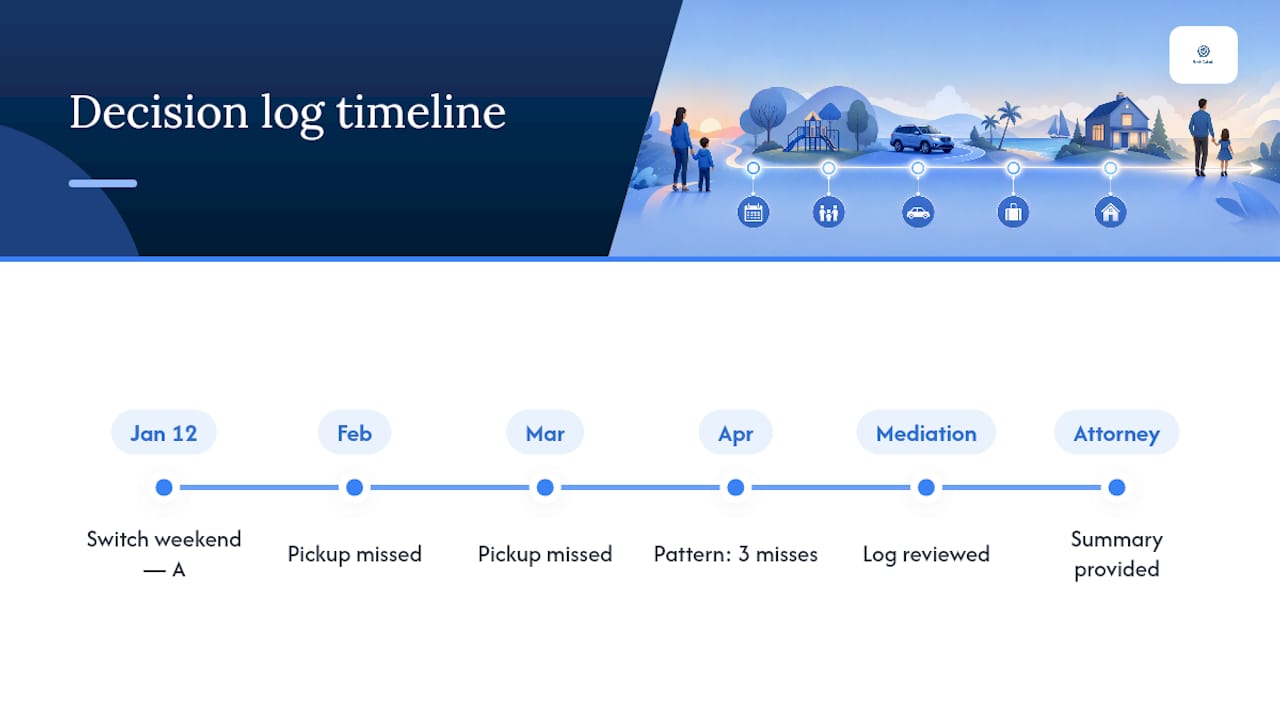
Keep the log private day to day. Only collate and share entries when you're heading into mediation, a custody review, or when your attorney asks for a summary. Sharing raw entries with your co-parent as they're written invites edits, denials, and arguments over your own notes.
Copy-Paste Decision Log Template You Can Use Today
Seven columns cover almost every situation. Build this in Google Sheets, Excel, or on paper if you prefer, following this practical template used by co-parenting guides:
- Date — the calendar date of the event, not the date you wrote it down.
- Day — day of the week; useful for spotting weekend or holiday patterns.
- Time — when it happened, especially for exchanges and calls.
- Event Type — a short tag: "pickup," "medical," "school," "communication," "schedule change."
- What Happened (Facts Only) — one or two sentences, no adjectives, no interpretation.
- Witness / Proof — who saw it, or what document backs it up (text, email, photo).
- Exhibit Ref — a code like "B-14" linking this row to a saved file in your evidence folder.
| Date | Day | Time | Event Type | What Happened | Witness/Proof | Exhibit Ref |
|---|---|---|---|---|---|---|
| 3/12 | Thursday | 6 PM | Pickup | Co-parent arrived late, no prior notice | Text timestamp | B-14 |
Use dropdown menus for the Event Type column so entries stay consistent across months. This small habit makes filtering and exporting far easier later, and it matches the structured template format most co-parenting guides recommend.
Digital sheets are searchable and easy to back up. Printable versions work better for parents who don't trust cloud storage or want a physical binder for court. Either way, export to PDF monthly. A PDF with a timestamp is harder to dispute than a live spreadsheet anyone could theoretically edit.
How to Write Entries That Hold Up Under Scrutiny
Write every entry as if a judge might read it aloud in six months. That mental filter alone eliminates most of the mistakes parents make in these logs.
- Skip adjectives like "furious," "irresponsible," or "typical." State what happened, not how you felt about it.
- Log the same day the event occurs. If you're catching up later, write "entered 3/15 re: event on 3/12" so the delay is honest and visible.
- Quote text messages verbatim when they contain agreements or admissions. Paraphrasing an agreement is how disputes happen later.
- Tie every entry to proof through your Exhibit Ref column, whether that's a screenshot, an email, or a school record.
Pro Tip: Log at least one neutral or cooperative moment for every few conflict entries. A log that only records fights reads as advocacy, not evidence, and both mediators and judges notice the imbalance.
Clinical co-parenting guidance also stresses keeping kids out of the communication chain entirely, so logs should reflect adult-to-adult exchanges, not messages relayed through a child. If a conversation ever gets funneled through your kid, that itself belongs in the log as a fact, not a complaint.
Spreadsheet or App: Matching the Tool to Your Conflict Level
A spreadsheet is enough for co-parents with low conflict and mostly cooperative decision-making. Turn on version history, export to PDF monthly, and back up to a second cloud account. That's a complete workflow for most low-friction situations.
High-conflict situations call for something sturdier:
- Timestamped, non-editable entries that can't be altered after the fact, which matters if your co-parent ever claims you edited the record.
- Court-ready exports that generate a clean report instead of a raw spreadsheet dump.
- Built-in categorization so incidents sort themselves into buckets like custody conflicts, missed exchanges, or false accusations.
Mediators and some judges prefer tamper-evident records precisely because a spreadsheet's edit history, however clean, is still self-reported. An app with immutable timestamps removes that question entirely. Whichever tool you pick, cross-reference everything: keep a folder of originals named to match your Exhibit Ref codes, and back it up in two places. A custody calendar app can also help you catch scheduling patterns your log alone might miss.
Getting Your Log Ready for Mediation or Court
Contemporaneous records, meaning entries made close to the event, carry more weight than reconstructed memories. Federal Rule of Evidence 901 governs how records get authenticated, and courts generally favor documentation with clear version history or a witness who can back up when it was written.
To prepare a log for a hearing:
- Export the full log to PDF with timestamps visible.
- Pull the specific entries relevant to the dispute rather than submitting months of unrelated rows.
- Match each cited entry to its Exhibit Ref file so your attorney or mediator can find the underlying proof fast.
A well-kept log is a persuasive timeline for settling disputes informally. It is not automatically formal evidence, and treating it that way without legal guidance is a mistake. Ask an attorney how your specific court handles personal records before assuming your spreadsheet will be accepted as-is.
How Replycalmly Turns Daily Logging Into Court-Ready Records
Replycalmly builds on the exact workflow this template supports: keep a private spreadsheet for daily logging, then move key incidents into a system designed for documentation once conflict escalates.
- A response generator that drafts calm, firm, or short replies to hostile messages, so you're not composing under stress.
- Incident tracking that categorizes conflicts (custody disputes, manipulation, false accusations) and visualizes patterns on a dashboard.
- Exhibit-ready exports built for mediation and court, plus decree violation detection that flags issues your spreadsheet won't catch on its own.
- Privacy-first design that integrates with court-mandated tools like OurFamilyWizard rather than replacing them.
A single, well-tagged incident log does more to end "he-said-she-said" disputes than months of unsorted text screenshots ever will.
Pro Tip: Run your toughest incoming messages through a response tool before replying. A calm, factual reply is easier to defend later than one written in the heat of the moment.
Combine a private spreadsheet for the small stuff with a structured logging platform for anything that might matter later. That two-layer habit is what separates parents who show up to mediation organized from those who show up with a phone full of screenshots.
Why Templates Beat Good Intentions
Most co-parenting advice tells you to "communicate clearly" and "stay calm," which is true and mostly useless without a system behind it. What actually works is boring: the same seven columns, filled in the same day, every time. Parents who wait to log until a dispute flares up almost always reconstruct events from memory, and memory is exactly what gets picked apart in mediation.
The conventional wisdom oversells the custody journal, long narrative entries about how a co-parent made you feel, and undersells the plain factual log. Judges and mediators don't need your feelings. They need a timeline they can verify. If you only do one thing differently after reading this, make it the discipline of same-day entries over the format you use to store them.
Where a spreadsheet reaches its limit is tamper-evidence and volume. A parent logging three or four incidents a month can maintain a clean sheet by hand. A parent fielding daily hostile messages needs something built for that pace, which is where a dedicated system earns its place rather than staying a nice-to-have.
— Reply Calmly Team
Try the Free Tools Before You Need Them in Court
You don't need a court date to start using Replycalmly. The free response generator is the fastest way to see the value: paste in a difficult message, get back a calm, firm, or short reply option, and send something you won't regret rereading later.

Once you're ready for full incident tracking, category tagging, pattern dashboards, and court-ready report exports, the subscription tier picks up where the free tools leave off, starting with a 3-day free trial. If you're already fielding threats or escalating messages, the guide on how to respond to custody threats walks through language that protects you without escalating the conflict further. Start with the free generator today, and upgrade only once you actually need exhibit-ready exports for mediation or court.
Sources
Law on child custody, Cleveland Clinic's co-parenting guidance, and Co-Parenting Guide's log template.
- Law
- Free Co-Parenting Log Template — Co-Parenting Guide
- Templacity — Co-parenting communication log (2026)