
Why organizing communication for court changes your outcome
Judges decide custody cases on evidence, not emotion. When two parents tell opposite stories, the court looks for something neutral to break the tie. A well-organized, dated, factual record is exactly that. Family court judges rely on contemporaneous records rather than competing memories, and that reliance directly shapes trial outcomes.
Clear organization also signals something beyond the evidence itself. Parents who present structured records help judges uphold procedural fairness and trust what they see. Disorganized evidence, by contrast, reinforces the perception that the legal process suits professionals, not the public. A judge processing hundreds of filings will move past a chaotic stack of screenshots and give weight to the parent who made their case easy to follow.
The benefits of organizing your communication records come down to a few concrete advantages:
- Improves evidence reliability: Dated, specific records beat vague recollections every time.
- Reduces ambiguity: Grouped, labeled messages leave no room for "that's out of context."
- Demonstrates cooperative intent: A balanced record that includes positive exchanges looks credible, not like a campaign against the other parent.
- Speeds up court review: A master index lets a judge find any exhibit in seconds.
- Supports authentication: Structured exports with intact metadata are far harder to challenge than cropped screenshots.
Pro Tip: Start your communication record the day a custody dispute becomes likely, not the day before your hearing. Courts give far more weight to records built consistently over time than to a file assembled the night before.
How to organize and manage your communications for court
The goal is a record a dispassionate professional can read and trust. Every practical choice you make should serve that goal.

Select and preserve relevant messages. Pull only communications tied to specific custody claims: schedule violations, safety concerns, refusals to cooperate. Volume does not equal strength. A tight, specific record beats a 400-page dump of every text ever sent.
Export, don't screenshot. Courts prefer structured exports showing complete conversations with intact timestamps and metadata. Screenshots hide context, can be cropped, and are easy to challenge. Export full threads from your messaging app or co-parenting platform whenever possible.
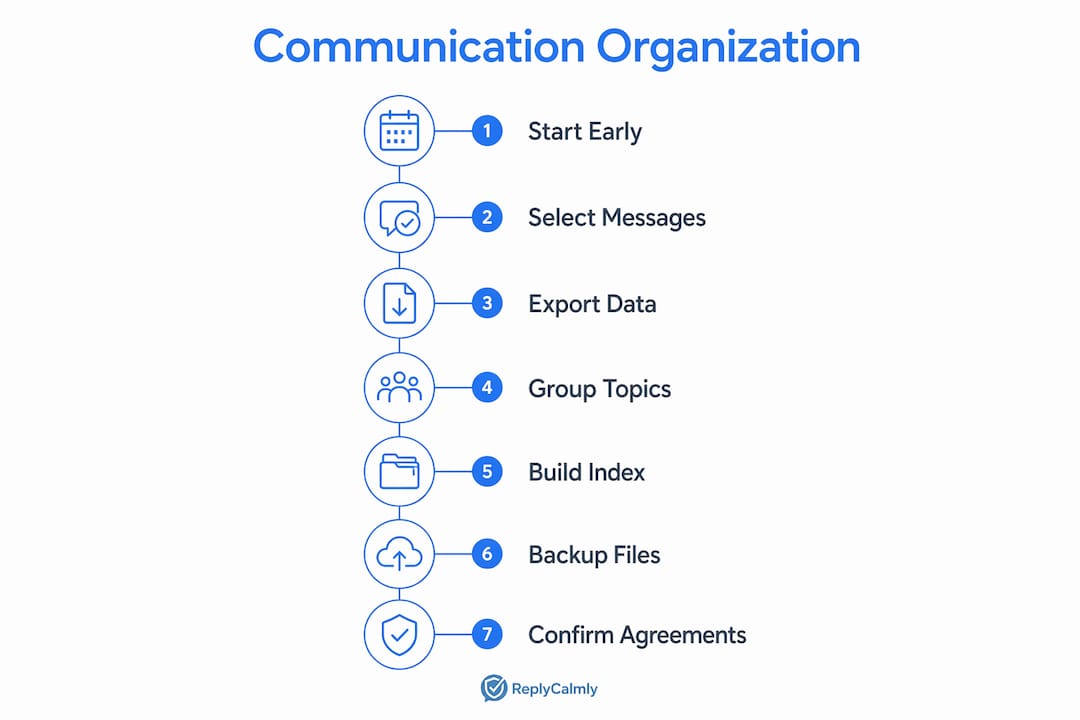
Group by topic, not just by date. Chronological order is a starting point, not a filing system. Group messages by the legal claim they support: schedule compliance, communication responsiveness, child safety. A judge evaluating a specific allegation should not have to hunt through a timeline to find relevant evidence.
Build a master index. Create a single document listing every exhibit with a unique number, date, brief description, and source. This is your table of contents. When your attorney or the judge needs exhibit 14, the index gets them there in seconds rather than minutes.
Write every message as if a judge will read it aloud. This is the single most underrated habit in co-parenting disputes. Emotional or hostile language harms cases. Calm, factual, specific messages build a record you can be proud to hand to a court.
Back up in at least two places. Cloud storage plus a local copy. If your phone breaks or an account gets locked, your record survives.

Pro Tip: After any verbal agreement with your co-parent, send a brief confirming text immediately: "Confirming we agreed you'll have the kids next Friday instead of Thursday." That one sentence turns an unrecorded conversation into a dated, written record.
Court-approved co-parenting apps worth knowing
Three apps come up consistently in family law contexts: AppClose, Talking Parents, and Custody X Change. They serve different needs, and knowing the difference saves you from picking the wrong one.
AppClose
AppClose is free, which makes it the most accessible starting point for parents who need a documented channel fast. It logs messages with timestamps neither parent can edit and includes a shared calendar for scheduling. The export function produces a PDF record suitable for court submission. The free tier covers most of what a parent in a moderate-conflict situation needs, though the interface is simpler than the paid alternatives.
Talking Parents
Talking Parents positions itself specifically around court admissibility. Every message is permanently archived and unalterable, and the platform offers certified records exports that come with a declaration of authenticity. That declaration matters: it addresses the authentication question courts raise about digital evidence. Pricing starts at a low monthly rate for the basic plan, with a premium tier adding features like call recording. For high-conflict cases where the other parent disputes message content, Talking Parents' certified records carry real weight.
Custody X Change
Custody X Change focuses more on parenting plan management and custody scheduling than on messaging, but it includes a communication log and a journal feature for documenting incidents. Its strongest feature is the parenting time tracker, which calculates actual time spent against the court order. That data is useful when you need to show a pattern of schedule violations. It runs on a subscription model and is available on iOS, Android, and desktop.
| Feature | AppClose | Talking Parents | Custody X Change |
|---|---|---|---|
| Message archiving | Yes, timestamped | Yes, certified | Yes, with journal |
| Court export | PDF export | Certified records | Log and time reports |
| Pricing | Free tier available | Low monthly fee | Subscription |
| Scheduling tools | Shared calendar | Basic calendar | Full parenting plan |
| Court acceptance | Generally accepted | Strong authentication | Accepted for logs |
Pro Tip: If a court order already specifies a communication platform, use that one exclusively. Using a different app alongside it can create conflicting records and raise questions about why you routed certain messages elsewhere.
How courts actually evaluate your communication records
Judges assess communication evidence on three questions: Is it specific? Is it dated close to when the event happened? Does it stay factual rather than argumentative? A record that clears those three bars carries weight. One that reads as a one-sided campaign against the other parent gets discounted.
Authentication is the first hurdle. Courts are wary of edited screenshots and prefer files with a maintained chain of custody and intact digital metadata. A certified export from a co-parenting platform addresses this directly. A cropped screenshot from a personal phone does not, and the other side's attorney will say so.
Common communication mistakes that weaken cases include:
- Hostile or emotional language: Angry messages become exhibits for the other side, not yours.
- Lack of context: Isolated messages that hide the surrounding conversation invite challenges.
- Documenting only the bad: A record with zero cooperative moments reads as advocacy, not history. Include the times things went smoothly.
- Disorganized presentation: Judges process hundreds of filings. A disorganized stack of documents buries your strongest points.
- Gaps in the record: Inconsistent documentation suggests the record was assembled for trial, not maintained as a habit.
Communication logs serve a specific function beyond evidence: they demonstrate compliance and cooperation. A parent who can show a consistent record of responding promptly, following the parenting plan, and keeping exchanges child-focused looks reliable. That perception influences how a judge weighs everything else in the case. For guidance on how legal investigators handle electronic evidence, the authentication standards they apply are the same ones family court judges use.
Best practices from recent legal guidance for organizing your records
The most effective record is not the longest one. It is the most organized one. Legal practice guides and court self-help resources consistently point to the same methods.
Use a master index with Bates numbering. Effective court organization requires a master index that categorizes documents by topic with unique identifiers. Bates numbering, where each page carries a sequential identifier, lets anyone cite a specific page instantly. "See Exhibit 7, page 3" is far more useful than "somewhere in that stack of texts."
Group by legal claim, not just by date. Organizing evidence by legal claim improves how quickly a judge can evaluate documents relevant to a specific custody issue. If your claim is that the other parent repeatedly missed scheduled pickups, group every relevant message, log entry, and timestamp together under that claim.
Prefer complete exports over screenshots. Courts rely on complete conversations to verify authenticity. A full export with intact metadata is harder to challenge than a cropped image. If you must use screenshots, capture the full thread including phone numbers, dates, and surrounding context.
Maintain chain of custody for digital records. Document how you preserved each file: where it was stored, when it was exported, and whether it was altered. File hashes, which are digital fingerprints confirming a file has not been changed, are the gold standard for authentication. Co-parenting apps that provide certified exports handle this for you.
Include balanced, factual notes. Document the cooperative moments alongside the conflicts. A record that only catalogs failures looks like a campaign. A balanced one looks like a reliable account of what actually happened.
Use a trial notebook or binder. California's court self-help guides recommend a three-ring binder with numbered divider tabs corresponding to your master index. Place the index at the front. This is what you hand the judge or court clerk when asked for exhibits.
The table below summarizes the core organizational methods and what each one accomplishes in court.
| Method | What it does for your case |
|---|---|
| Master index with Bates numbering | Lets judge and attorneys cite any page instantly |
| Grouping by legal claim | Connects evidence directly to the issue being decided |
| Complete message exports | Satisfies authentication standards, harder to challenge |
| Chain-of-custody documentation | Proves the record was not altered after the fact |
| Balanced documentation | Signals credibility, not advocacy |
| Trial notebook or binder | Keeps everything accessible under pressure in court |
Replycalmly is built around exactly this kind of structured approach. The platform logs incidents, categorizes issues by type (custody conflicts, schedule violations, false accusations), and generates calm, court-appropriate responses to difficult messages. It also integrates with existing court-mandated tools rather than replacing them. If you are managing a high-conflict co-parenting situation and want your communication records organized before your next hearing, it is worth a look.
Try Replycalmly before your next hearing

Replycalmly's co-parent response generator takes the message you received and produces multiple calm, court-appropriate replies: calm, firm, or short. Paste the message, get a reply. No subscription required to try it.
Beyond responses, the platform tracks patterns over time, categorizes incidents, and builds the kind of documented record that holds up in court. For parents navigating a high-conflict custody case, that combination of response support and documentation is hard to find anywhere else.
Key Takeaways
Organized, factual, and well-indexed communication records are the single most reliable way to influence how a judge evaluates your custody case.
| Point | Details |
|---|---|
| Judges rely on records, not memory | Contemporaneous, dated records carry far more weight than verbal accounts of past events. |
| Group evidence by legal claim | Organizing by claim, not just by date, helps judges evaluate documents relevant to each specific issue. |
| Exports beat screenshots | Complete message exports with intact metadata satisfy authentication standards that screenshots often fail. |
| Balance matters | Including cooperative moments alongside conflicts makes a record look credible rather than one-sided. |
| Tone shapes outcomes | Hostile or emotional messages become evidence against you; calm, factual communication builds a stronger record. |