
Most families pay somewhere between free and under $300 a year for a co-parenting app, and the biggest swing factor isn't the feature list. It's whether the vendor bills per parent or per household. Free apps cover basic scheduling and messaging fine for low-conflict situations, but if you need court-ready documentation, budget for a paid plan with exportable, timestamped records. Skip that, and you're gambling with your case file.
TL;DR:
- Most families spend between free and $300 annually on co-parenting apps, with the billing model (per parent or household) having a bigger impact on total cost.
- Free apps are suitable for low-conflict situations and lack court-ready export features, which are included only in paid plans.
- Household billing plans generally cost less overall and simplify bill splitting compared to paying separately per parent.
- Key features that justify paid plans include secure, exportable messaging, expense tracking, and court recognition capabilities.
- Using free tools initially and upgrading only when legal documentation is needed helps avoid unnecessary expenses.
Table of Contents
- How Much Does a Co-Parenting App Cost per Month?
- Per-Parent vs. Household Billing: Which Costs Less?
- Which Features Push a Co-Parenting App from Free to Paid?
- Real Family Cost Examples: Per-Parent vs. Household Plans
- Do You Need to Pay, or Is Free Enough?
- How Do You Split the Bill Without Starting a Fight?
- Why ReplyCalmly's Subscription Pays for Itself in High-Conflict Cases
- What Parents Get Wrong About Co-Parenting App Pricing
- Start With Replycalmly's Free Tools, Upgrade When Documentation Matters
- Sources
How Much Does a Co-Parenting App Cost per Month?
Co-parenting app pricing splits into three rough bands, and knowing where you land depends on what you actually need the app to do.
Free plans cover the basics: shared calendars, basic messaging, and simple expense notes. The catch is almost always in the limits. Expect message history caps (often 30 to 90 days), a narrow calendar window, and no export function for anything you might need in court. Free is fine for amicable co-parents who just need to stay coordinated.
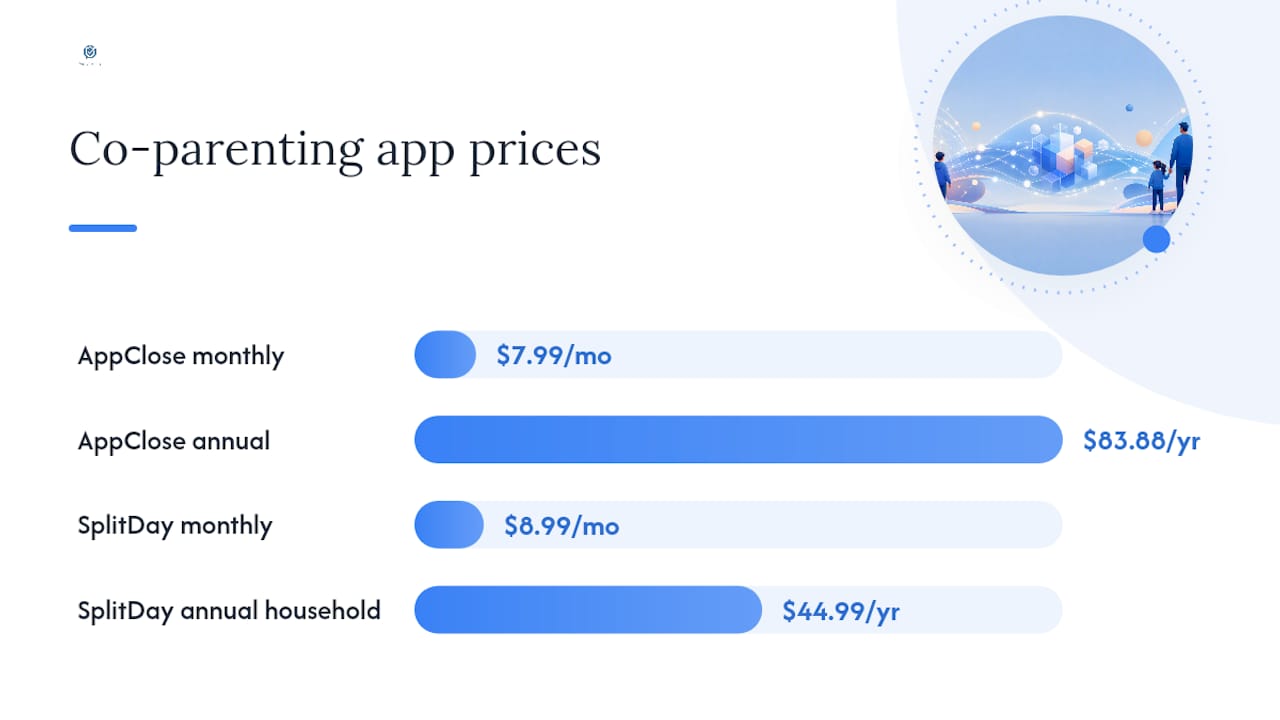
Low-cost paid plans run roughly $7 to $9 a month per parent. AppClose charges $7.99 a month on the web, with an $83.88 annual prepay option that lowers the effective monthly cost. SplitDay prices its Pro tier at $8.99 a month or $44.99 a year, and notably lets one subscription cover the entire household instead of billing each parent separately.
Premium tiers climb higher, often $12 to $25 or more per parent per month, and that's where attorney portals, unlimited message archives, and advanced report exports usually live. OurFamilyWizard lists multiple tiers with annual equivalents, including an Essentials-style plan around $149.99 a year, with premium tiers priced higher still.
A few things change your effective price beyond the sticker number:
- Annual prepay usually knocks 10 to 20% off the monthly rate compared to paying month to month.
- App-store purchases (through Apple's App Store or Google Play) sometimes run higher than the same subscription bought directly on a vendor's website, since store fees get baked into the listed price.
- Multi-year prepay options, where offered, push the effective monthly cost down further, though you're locking in longer.
Always check the vendor's pricing page directly before assuming a number you saw in a review is current. Prices shift, and app-store listings don't always match the web price.
Per-Parent vs. Household Billing: Which Costs Less?
The billing model matters more than the feature list when you're calculating what your family will actually spend in a year. There are three structures worth understanding.
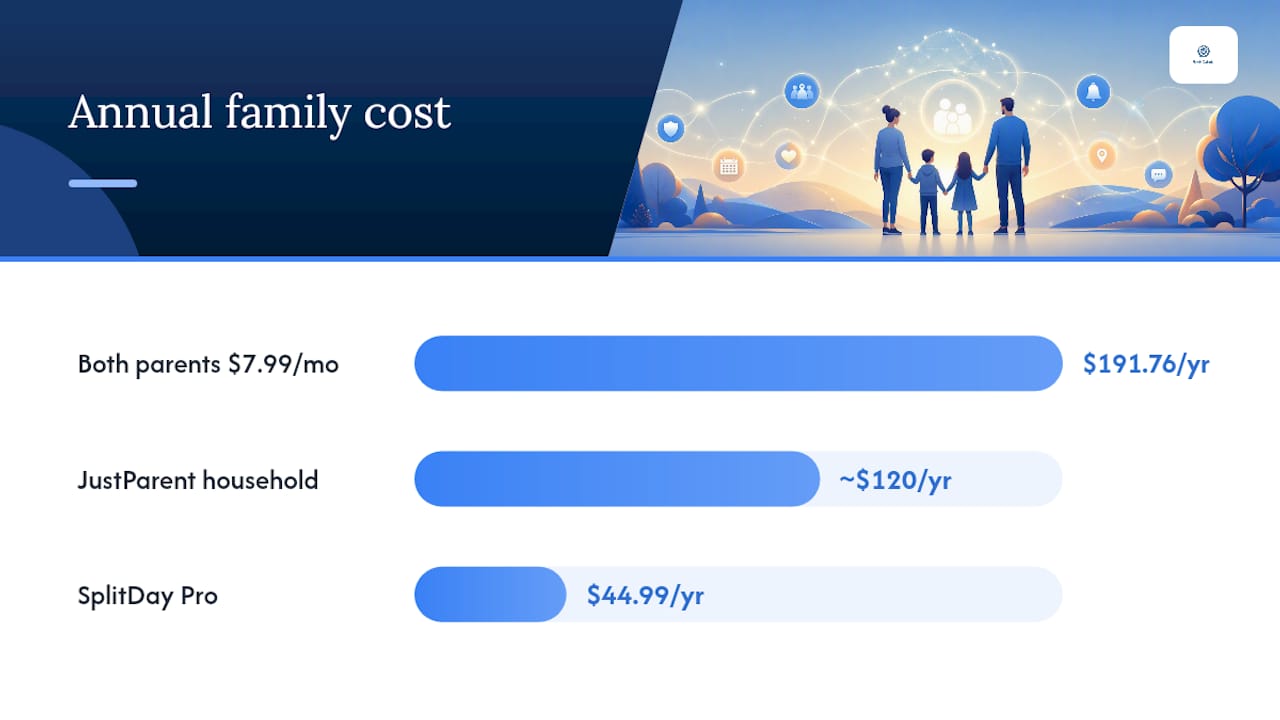
- Per-parent billing. Each parent pays their own subscription. Do the math as: monthly price × 12 × number of paying parents. A $7.99/month plan paid by both parents comes to $191.76 a year for the family, even though the per-user price looks cheap.
- Household billing. One payment covers both parents under a single account. JustParent prices its household plan at about $120 a year, and SplitDay offers the same structure at $44.99 a year for its Pro tier. This model tends to produce the lowest total family cost, and it removes a common flashpoint: who pays.
- One-time or lifetime licenses. Some vendors offer a flat, one-time fee instead of a recurring subscription. These can look attractive on paper, but check whether "lifetime" actually includes ongoing feature updates and support, or just locks you into the version you bought.
Household billing also changes the negotiation dynamic. If one plan invites the other parent for free once the account is paid, you avoid the awkward conversation about splitting a bill every month.
Pro Tip: Don't compare apps by their advertised monthly price alone. Multiply it out to the full annual family cost, including both parents, before you decide anything is "cheap."
Which Features Push a Co-Parenting App from Free to Paid?
Vendors reserve certain features for paying customers because those features cost more to build, host, and support, and because they're the ones parents actually need when a custody situation gets contentious.
- Secure, archived messaging with exportable, timestamped reports. This is the single biggest reason parents upgrade. Free tiers often let messages age out or block exports entirely.
- Expense submission and reimbursement tools. Tracking who owes what for medical bills or extracurriculars usually sits behind a paywall once it includes receipt uploads or automated splitting.
- Professional or attorney portals. Giving a lawyer read access to your communication log is a premium feature, and it's the kind of thing vendors marketing to courts lean on heavily to justify higher price points.
- Custom custody calendar templates and long-range scheduling. Basic week-to-week calendars are usually free; multi-year rotating schedules and holiday templates often aren't.
- Ad-free use, backups, and household sharing. Smaller conveniences, but they add up if you're on a free tier that nags you constantly.
- Support level and court recognition. Apps with a track record of being accepted in family court proceedings, and that offer responsive customer support, tend to price higher than newer or less-established tools.
None of these features are wasted money if you're documenting a high-conflict situation. They're wasted money if you're not.
Real Family Cost Examples: Per-Parent vs. Household Plans
Numbers make this concrete faster than any explanation. Here's how three common billing structures play out for a two-parent household over a year.
- Per-parent plan at $7.99/month. Both parents subscribe individually. Annual family cost: $7.99 × 12 × 2 = $191.76.
- Household flat plan at $120/year. One subscription, both parents included. Annual family cost: $120.00.
- Premium per-parent plan with annual discount. Say a premium tier lists at $14.99/month but drops to $149.99/year when prepaid, per the tier structure OurFamilyWizard publishes. If both parents need their own premium account, that's $299.98 a year, though buying through an app store instead of the web could push it higher.
The deciding factor isn't the brand. It's whether you're paying per parent or per household, and whether you actually need premium-tier exports.
Do You Need to Pay, or Is Free Enough?
The honest answer depends entirely on whether court involvement is realistic, not on how much conflict you're dealing with day to day.
Pay for a plan when:
- You need court-ready exports, timestamped incident logs, or a dashboard showing communication patterns over months.
- Your attorney has asked for organized documentation, or you anticipate a custody modification hearing.
- You're dealing with recurring conflict that needs to be tracked systematically, not just messaged through.
Free is probably fine when:
- Co-parenting is low-conflict and mostly involves scheduling logistics.
- You just need a shared calendar and basic messaging without a legal paper trail requirement.
- Neither parent anticipates needing to prove a pattern of behavior to a judge or mediator.
Tools that help you draft calmer, more measured responses to difficult messages add a different kind of value: they reduce the conflict itself, rather than just recording it. That's a separate benefit from pure record-keeping, and worth weighing on its own.
Pro Tip: If there's any chance your case ends up in front of a judge, talk to your attorney before deciding the free tier is enough. A missing paper trail is a lot harder to fix after the fact than a $9 monthly fee is to swallow now.
For more on which platforms hold up under legal scrutiny, see our comparison of family court communication software.
How Do You Split the Bill Without Starting a Fight?
Getting this right up front saves you a recurring argument. A few practical moves:
- Propose a household plan directly and neutrally: "I found an option that covers both of us for one flat annual fee. Want to split it, or should I just handle it?" That framing avoids blame and keeps the request transactional.
- Use the free trial period, usually a few days, to confirm the export format and report style actually match what your attorney or the court requires before you commit to paying.
- Check the auto-renew terms and cancellation policy before subscribing. App-store purchases sometimes have different refund rules than a direct web subscription.
- If a court order names a specific platform, verify the accepted export formats first. Switching tools mid-case over a format mismatch is a headache you can avoid entirely.
A family law resource like this overview of co-parenting app practices is worth a read if you're unsure what courts in your area expect.
Why ReplyCalmly's Subscription Pays for Itself in High-Conflict Cases
Replycalmly's free tier includes the AI response generator and child messaging tool, useful for anyone who just needs help wording a message calmly. The paid subscription earns its keep once documentation becomes the priority: the incident tracker categorizes conflicts (custody disputes, manipulation, false accusations), builds pattern dashboards over time, and generates court-appropriate reports.
If you're already using a court-mandated tool like OurFamilyWizard, Replycalmly layers on top rather than replacing it, adding an accountability record and calmer response drafting without duplicating your existing system. For anyone bracing for a modification hearing or working closely with an attorney, that combination of response support and structured documentation is what justifies paying rather than sticking with a free messaging app. See the full breakdown of documentation-focused co-parenting apps for more detail.
What Parents Get Wrong About Co-Parenting App Pricing
The most common mistake we see is parents comparing the monthly sticker price without ever calculating the annual family total. A $7.99 plan sounds cheap until two parents are each paying it separately, and suddenly it's $192 a year instead of $96.
Our recommendation: start free, and upgrade the moment documentation or pattern reports become necessary, not before. When you do upgrade, have the parent who'll actually manage the record-keeping start the subscription first. It avoids the awkward scenario where both parents accidentally pay for the same household plan.
— Reply Calmly Team
Start With Replycalmly's Free Tools, Upgrade When Documentation Matters
Replycalmly runs on a freemium model: the AI response generator and child messaging tool are free to use right now, no subscription required. When you need the full incident tracker, pattern dashboards, and court-ready report generation, the subscription is $19 a month after a 3-day free trial, no long-term commitment required.

That $19 covers exportable, timestamped documentation, categorized incident tracking, and calm, firm, or short response drafts you can send with confidence instead of anger. Compared to paying per parent on a premium tier elsewhere, it's a straightforward, single price for tools built specifically around high-conflict situations rather than general scheduling. Try the free response generator first to see how it handles a real message, then start your trial when you're ready to build a documented record you can actually use.
Sources
- Plans and Pricing | OurFamilyWizard
- AppClose - Pricing
- Co-Parenting App Pricing: Free & Pro Plans | SplitDay