
For court-ready messaging and tamper-evident logs, OurFamilyWizard and TalkingParents are the most widely recognized options. For case preparation, calm reply drafting, and organized incident documentation, Replycalmly is the strongest fit. Most parents in high-conflict situations need both categories working together.
Here is the shortlist by use case:
Court-ready messaging and calendar apps:
- OurFamilyWizard — tamper-evident messaging, shared calendar, expense logs, ToneMeter; frequently court-ordered
- TalkingParents — immutable archived messages, timestamped exports; strong for evidence preservation
- AppClose — all-in-one messaging, calendar, and expense tracking; flat subscription; county court agreements in some jurisdictions
Scheduling-focused tools:
- Custody X Change — parenting time calculations, schedule creation, court-ready parenting plan reports
- 2Houses — shared calendar, finance tracking, parent coordination; best for cooperative co-parents
- WeParent — simple scheduling and basic messaging for low-to-medium conflict situations
- Cozi — free general family organizer; not designed for court evidence
Case-prep and evidence tools:
- Replycalmly — response generator (calm, firm, short), incident tagging, pattern dashboards, court report exports
- BestInterest — AI Message Shield filters hostile language before delivery; newer entrant focused on de-escalation
When do you need both? A messaging app alone is enough for low-conflict parents who just need a shared record. Once your attorney starts asking for organized documentation, or a judge orders a specific platform, add a case-prep tool. Messaging apps create raw, timestamped records, but users still must manually connect messages to specific claims — that gap is where case-prep software earns its place.
Pro Tip: Before downloading anything, ask your attorney whether the court has already ordered a specific platform. Switching apps mid-case can create gaps in your record.

Table of Contents
- Which family court communication software fits your situation?
- Detailed profiles: what each app actually does
- Full feature matrix: what courts and attorneys look for
- How do you choose the right co-parenting app?
- Are co-parenting app logs actually accepted as evidence?
- Why messaging apps are not the same as case preparation
- Which app should you use? Scenario-based recommendations
- Key Takeaways
- What we actually think about co-parenting apps
- Replycalmly helps you document and respond, not just log
- Useful sources
Which family court communication software fits your situation?
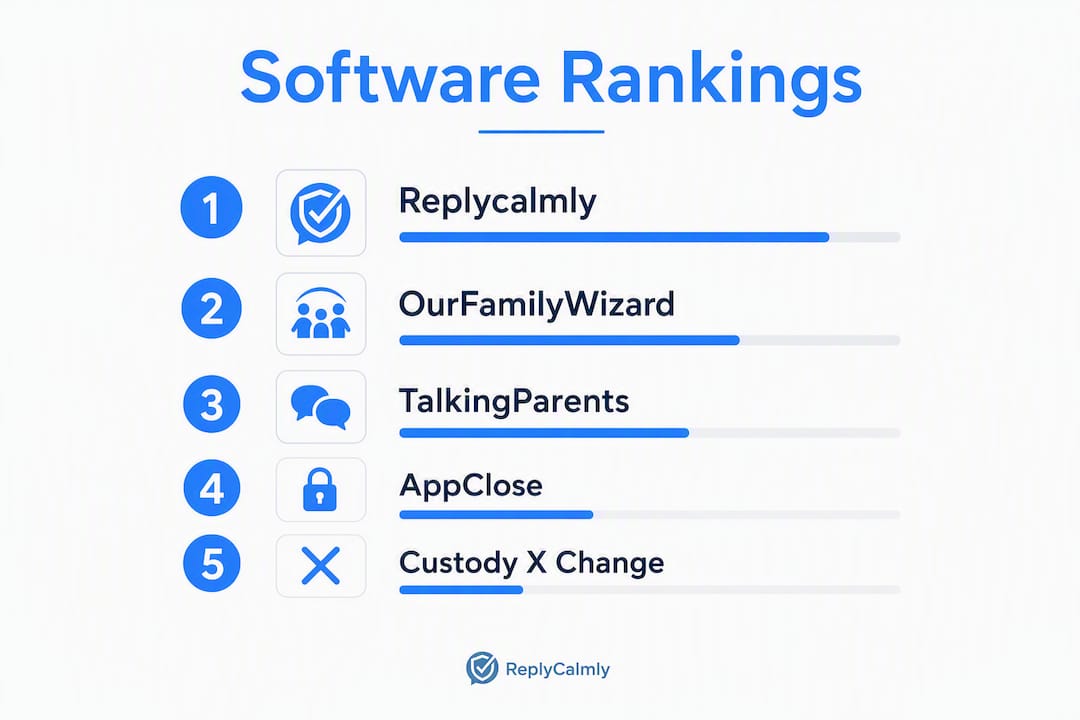
The table below maps each tool to the criteria judges and attorneys care about most. Replycalmly leads because it is the only option here that combines calm reply drafting with structured incident logging and court report exports.
| App | Best for | Pricing | Court-ready / tamper-evident | Messaging features | Scheduling / calendar | Expense tracking | Reporting & attorney access | Mobile & web | Privacy & security |
|---|---|---|---|---|---|---|---|---|---|
| Replycalmly | High-conflict case prep + calm reply drafting | Free tier; $19/mo after 3-day trial | Court report exports, incident tagging, pattern dashboards | Response generator (calm, firm, short); decree violation detection; templates | — | — | PDF court reports; attorney sharing | Web (mobile-friendly) | Private logs; integrates with OFW |
| OurFamilyWizard | Court-ordered high-conflict communication | ~$100+/yr per parent | Tamper-evident messaging; PDF/CSV exports | ToneMeter tone detection; mediated messaging | Shared calendar | Yes, with receipts | PDF/CSV; attorney/professional account | iOS, Android, web | Encrypted; long data retention |
| TalkingParents | Immutable timestamped message logs | Free basic; paid tiers for exports | Uneditable archived messages; timestamped exports | Secure messaging; no tone tool | Basic scheduling | — | PDF/CSV exports | iOS, Android, web | Archived, uneditable records |
| AppClose | Single-app simplicity + local court agreements | Flat monthly subscription | Secure messaging; some county court agreements | Messaging; no advanced tone tool | Shared calendar | Yes | Export available | iOS, Android, web | Secure platform |
| Custody X Change | Parenting time disputes and schedule calculations | One-time or subscription fee | Parenting plan reports | — | Robust schedule builder | — | Parenting time reports; PDF | iOS, Android, web | Standard security |
| 2Houses | Cooperative co-parents needing shared organization | Monthly subscription | Basic logging | Messaging | Shared calendar | Yes | Export available | iOS, Android, web | Standard security |
| WeParent | Low-to-medium conflict; simple organization | Free and paid tiers | Basic logging | Basic messaging | Shared calendar | — | Limited export | iOS, Android | Standard security |
| Cozi | Low-conflict scheduling only | Free core; Cozi Gold paid | Not designed for court use | — | Shared calendar | Shopping/task lists | None | iOS, Android, web | Standard security |
| BestInterest | Message de-escalation; AI screening | Subscription (check provider) | AI message filtering before delivery | AI Message Shield; hostile language filtering | — | — | Limited; check provider | iOS, Android | AI-filtered messaging |
Pricing note: Pricing models vary across apps — some charge per parent annually (OurFamilyWizard runs around $100+ per parent per year), others use flat monthly subscriptions (AppClose), and some offer free tiers with paid export access (TalkingParents). When a court orders both parents onto the same platform, per-parent annual fees add up fast. Replycalmly's $19/month subscription covers one parent's full case-prep workflow, with no per-parent pairing requirement.
Detailed profiles: what each app actually does
Replycalmly
Replycalmly sits in a different category than the messaging apps below. It does not replace OurFamilyWizard or TalkingParents. Instead, it works alongside them, giving you a place to draft calm replies, tag incidents by category (custody conflict, manipulation, false accusations, decree violations), and generate court-appropriate reports your attorney can actually use.
The free tier includes the co-parent response generator and child messaging scripts. The paid subscription ($19/month after a 3-day free trial) unlocks incident logging, pattern dashboards, evidence attachments, and PDF court report exports. Attorney sharing is built in. For parents who have been told by their lawyer to "document everything," this is the tool that makes that instruction practical rather than overwhelming.
Strengths: Response generator with calm, firm, and short variations; incident tagging and categorization; decree violation detection; court report exports; integrates with existing court-mandated tools. Limitation: Not a standalone messaging platform; works best paired with a court-ordered messaging app.
OurFamilyWizard
OurFamilyWizard has been around long enough that many family court judges recognize it by name. Its ToneMeter feature flags messages that may read as hostile before you send them, which matters in high-conflict cases where tone alone can affect how a judge reads a transcript. Tone-detection tools like ToneMeter are designed to reduce hostility before sending, and OurFamilyWizard has offered this longer than most competitors.
Exports come in PDF and CSV formats. Attorneys can get a professional account to view the record directly. The per-parent annual fee (reported around $100+ per parent) is the main friction point when courts order both parents to join.
Strengths: Court recognition, ToneMeter, shared calendar, expense logs with receipts, attorney access. Limitation: Per-parent pricing adds up; no claim-level case organization.
TalkingParents
TalkingParents keeps it simple: every message is archived automatically, timestamped, and cannot be edited or deleted after sending. That immutability is its core selling point. The free tier covers basic messaging; paid tiers unlock PDF and CSV exports, which you will need for court.
No tone tool, no expense tracking in the base product. For parents whose primary need is a clean, uneditable message record, TalkingParents delivers that without complexity.
Strengths: Uneditable archived records, clear export formats, straightforward interface. Limitation: Limited features beyond messaging; exports locked behind paid tiers.
AppClose
AppClose bundles messaging, a shared calendar, and expense tracking into one flat-fee subscription. Its standout differentiator is formal agreements with some county courts, which can matter if your local jurisdiction has adopted it. Worth checking whether your county is one of them before committing.
Strengths: All-in-one, flat pricing, local court agreements in select counties. Limitation: No advanced tone detection; court acceptance varies by jurisdiction.
Custody X Change
Custody X Change is not primarily a messaging app. It is scheduling and parenting-plan software. If your dispute centers on parenting time percentages — who has the child what percentage of nights, how holiday schedules break down — Custody X Change produces the kind of detailed reports courts expect to see. Less useful for ongoing communication logging.
Strengths: Parenting time calculations, schedule creation, court-ready parenting plan documents. Limitation: Not designed for daily communication logging or evidence organization.
2Houses
2Houses covers the basics: shared calendar, messaging, and finance tracking. It is aimed at cooperative co-parents who want one organized place for logistics. The interface is family-friendly and accessible for parents who are not particularly tech-savvy.
Strengths: Easy shared organization, finance tracking, accessible design. Limitation: Limited tamper-evidence features; better suited to low-conflict situations.
WeParent
WeParent is a family organizer first. Scheduling and basic messaging work fine for parents who are mostly on the same page. It does not have the court-recognition track record of OurFamilyWizard or TalkingParents, and its export capabilities are limited.
Strengths: Simple, low-friction setup; good for low-to-medium conflict. Limitation: Limited court-ready features; not suited for high-conflict litigation.
Cozi
Cozi is a general family scheduling app that some separated parents use because it is free and familiar. It was not built for custody situations. There is no tamper-evidence, no court-ready export, and no messaging archive. Use it only if your co-parenting relationship is genuinely low-conflict and you need nothing more than a shared calendar.
Strengths: Free, widely used, easy shared calendar. Limitation: Not designed for court evidence; no tamper-proof logging.
BestInterest
BestInterest is a newer entrant built around its AI Message Shield, which screens messages for hostile language before they are delivered. The de-escalation angle is genuinely useful for parents who struggle to keep tone in check. Court-ready export capabilities are less established than OurFamilyWizard or TalkingParents, so verify current features directly with the provider before relying on it for litigation.
Strengths: AI message screening, de-escalation focus. Limitation: Newer platform; court recognition and export depth less proven than established competitors.
Pro Tip: If your court has ordered a specific app, use it. You can still run Replycalmly alongside it for incident documentation and response drafting without violating any court order.
Full feature matrix: what courts and attorneys look for
This matrix uses the same nine apps and focuses on the dimensions that matter in a courtroom context.
| App | Best for | Pricing | Tamper-evident logging | Tone control | Calendar | Expense tracking | Export formats | Attorney access | Security |
|---|---|---|---|---|---|---|---|---|---|
| Replycalmly | High-conflict case prep | Free / $19/mo | Incident logs, court reports | Response generator (calm/firm/short) | — | — | PDF court reports | Yes (sharing) | Private; integrates with OFW |
| OurFamilyWizard | Court-ordered high-conflict | ~$100+/yr per parent | Yes, tamper-evident | ToneMeter | Yes | Yes | PDF, CSV | Professional account | Encrypted |
| TalkingParents | Immutable message records | Free / paid export tiers | Yes, uneditable archive | None | Basic | None | PDF, CSV | Via export | Archived records |
| AppClose | All-in-one + local courts | Flat monthly | Secure messaging | None | Yes | Yes | Export available | Via export | Secure |
| Custody X Change | Parenting time disputes | One-time / subscription | Parenting plan reports | None | Robust scheduler | None | PDF reports | Via export | Standard |
| 2Houses | Cooperative co-parents | Monthly subscription | Basic | None | Yes | Yes | Export available | Via export | Standard |
| WeParent | Low-medium conflict | Free / paid | Basic | None | Yes | None | Limited | None listed | Standard |
| Cozi | Low-conflict scheduling | Free / Cozi Gold | None | None | Yes | Lists only | None | None | Standard |
| BestInterest | De-escalation / AI screening | Subscription | AI filtering | AI Message Shield | None | None | Check provider | Check provider | AI-filtered |
How do you choose the right co-parenting app?
Start with three diagnostic questions before you look at any feature list.
1. What is your conflict level? Low conflict means you and your co-parent mostly agree and communicate without hostility. Medium conflict means disagreements are frequent but not litigious. High conflict means attorneys are involved, court orders are in play, or you are documenting behavior for a hearing.
2. Is a court or attorney already involved? If a judge has ordered a specific platform, that decision is made for you. Use it. The question then becomes whether you also need a case-prep layer on top of it. If your attorney has asked you to "document everything," a messaging app alone will not satisfy that request — you need organized incident logs, not just a raw message archive.
3. What does your attorney need from you? Some attorneys want PDF exports from OurFamilyWizard or TalkingParents. Others want a structured incident log they can review before a hearing. Ask directly: "What format do you want documentation in, and how often should I send it?"
Feature checklist by conflict level
Low conflict:
- Shared calendar (2Houses, WeParent, Cozi)
- Basic messaging with a record
- No court-ready export required
Medium conflict:
- Secure, archived messaging (TalkingParents, OurFamilyWizard)
- Expense tracking if finances are disputed
- PDF export capability
High conflict / court-involved:
- Tamper-evident messaging (OurFamilyWizard, TalkingParents)
- Incident logging with category tagging (Replycalmly)
- Court report exports and attorney sharing
- Response drafting to keep tone appropriate
Questions to ask your attorney or the court
When a specific app is ordered, ask:
- Which version or tier is required?
- Who pays the subscription fee?
- What export format does the court accept?
- How often should I export and save records?
Red flags that mean you need case-prep software too
- Your attorney has mentioned a pattern of behavior you need to document
- You are dealing with repeated decree violations
- Allegations of abuse or neglect are part of the case
- You are preparing for a modification hearing
Knowing when to use third-party communication tools versus when to add a dedicated documentation layer is one of the most practical decisions you can make early in a custody dispute.
Pro Tip: Export your message logs at least once a month and save them to a secure location you control. Some platforms restrict export access on free tiers, so confirm your tier includes it before you need it. Lack of export or disappearing messages is a red flag for court use.
Are co-parenting app logs actually accepted as evidence?
The short answer: yes, courts often accept timestamped, uneditable logs, but acceptance is not automatic. Court acceptance depends on jurisdiction and on whether exports preserve metadata; attorneys frequently request native exports or signed affidavits backing the exports.
What judges look for:
- Tamper evidence: Was the record created by a neutral third-party platform, or could it have been altered?
- Metadata preservation: Does the export include timestamps, sender IDs, and message IDs?
- Chain of custody: Can you demonstrate the export came directly from the platform without modification?
- Context: A single message pulled out of a thread can be misleading; judges want surrounding context.
Best practices for preserving admissibility
- Export native logs (not screenshots) whenever possible; screenshots are easier to challenge
- Export on a consistent schedule — monthly at minimum — and date-stamp your file names
- Store exports in at least two locations (cloud and local)
- Attach corroborating evidence (photos, receipts, school records) to the relevant incident in your documentation
- Ask your attorney whether a notarized affidavit is needed to authenticate the export in your jurisdiction
- Add explanatory notes to your incident log at the time of the event, not weeks later
Jurisdiction matters more than most parents realize. A county judge in Texas may have a standing preference for OurFamilyWizard; a judge in California may accept any platform with a verifiable export. Confirm with your attorney or local clerk before assuming your platform's export format will be accepted.
If you need help assembling physical exhibits or notarizing documents for court, DIY filing guides and document services can walk you through the process.
This section is general information, not legal advice. Confirm current rules and export requirements with a licensed family law attorney in your jurisdiction.
Pro Tip: Log incidents the same day they happen. A note written six weeks after the fact carries far less weight than one timestamped within hours of the event.
Why messaging apps are not the same as case preparation
Practitioners consistently emphasize separating daily communication logging from legal case organization. These are two different jobs, and conflating them is one of the most common mistakes parents make before a hearing.
A messaging app does one thing well: it creates a timestamped, tamper-evident record of what was said. OurFamilyWizard, TalkingParents, and AppClose all do this. What they do not do is organize that raw material into anything an attorney can use efficiently. Communication apps create raw, timestamped records, but users still must manually connect messages to specific claims. That means a parent with two years of OurFamilyWizard exports still has to manually sort through hundreds of messages to find the three that prove a pattern of late pickups.
Case-prep software solves that problem. Instead of a raw archive, you get:
- Incidents tagged by category (custody conflict, decree violation, false accusation, communication breakdown)
- Evidence attached directly to the relevant incident
- Pattern dashboards that show frequency and escalation over time
- Court reports your attorney can review before a hearing, not a stack of PDFs
When case-prep software is essential
- Allegations of abuse or neglect where you need to demonstrate a documented pattern
- Repeated decree violations where you are seeking enforcement or modification
- Complex evidence chains involving multiple incidents across different categories
- Any situation where your attorney has said "I need this organized before we go in"
How the two categories work together
The incident logging workflow looks like this in practice: you communicate through OurFamilyWizard or TalkingParents (your court-ordered platform), export those logs periodically, and import or reference them in Replycalmly where you tag incidents, attach supporting evidence, and build the organized record your attorney actually needs. Best practice in litigation is to export messaging logs periodically, tag them by claim, attach corroborating evidence, and share a synchronized attorney-ready workspace rather than sending raw PDFs.
Replycalmly also handles the reply side of the equation. When you receive a hostile or manipulative message, the response generator produces calm, firm, or short variations you can send through your court-ordered platform. That keeps your tone consistent and your record clean.
Pro Tip: Think of your messaging app as the recorder and Replycalmly as the editor. One captures everything; the other turns it into something a judge can follow.
| Tool class | What it does | What it does not do |
|---|---|---|
| Messaging app (OFW, TalkingParents) | Tamper-evident logs, timestamped archive, calendar, expenses | Claim categorization, incident tagging, pattern analysis, attorney-ready reports |
| Case-prep tool (Replycalmly) | Incident tagging, pattern dashboards, court reports, response drafting | Replace a court-ordered messaging platform |
| Combined approach | Full coverage: clean record + organized case file + calm replies | — |
Which app should you use? Scenario-based recommendations
Low-conflict co-parents who primarily need a shared calendar and a basic message record: start with 2Houses or WeParent. If you want free scheduling, Cozi works. Export your records occasionally as a precaution, but you likely do not need a full case-prep workflow.
Co-parents with scheduling disputes where parenting time percentages are contested: Custody X Change is purpose-built for this. Pair it with TalkingParents for your message archive. Export both monthly and share with your attorney before any hearing.
High-conflict or court-involved parents where documentation, tone, and organized evidence all matter: use OurFamilyWizard or TalkingParents as your court-ordered messaging platform, and run Replycalmly alongside it for incident tracking and court report generation. Share your Replycalmly reports with your attorney before hearings. Use the response generator every time you receive a message that tempts you to respond emotionally.
Parents prioritizing de-escalation who want AI screening before messages are sent: BestInterest's AI Message Shield addresses that specific need. Verify its current export capabilities with the provider before relying on it for court.
Combining tools is not redundancy. A messaging app and a case-prep tool serve different functions. Using both is the approach attorneys and practitioners recommend for anyone with active litigation or a realistic chance of returning to court.
Key Takeaways
For parents in high-conflict custody situations, a messaging app alone creates a raw record but not an organized case file — you need both categories of tools working together.
| Point | Details |
|---|---|
| Messaging apps vs. case prep | Messaging apps log what was said; case-prep tools organize it by claim so attorneys can use it. |
| Export early and often | Export your message logs monthly and store them in two locations; some platforms lock exports behind paid tiers. |
| Jurisdiction determines acceptance | Courts vary by county and judge; confirm your platform's export format with your attorney before relying on it. |
| Ask your attorney first | If a court has ordered a specific app, use it — then decide whether you also need a case-prep layer. |
| Replycalmly for case prep | Replycalmly combines calm reply drafting, incident tagging, and court report exports for high-conflict parents who need organized documentation. |
What we actually think about co-parenting apps
Most roundups treat this as a feature checklist problem. Pick the app with the most checkboxes, pay the subscription, and you are covered. That framing misses the real issue.
The gap is not between apps. It is between what parents think they are building and what attorneys can actually use. Two years of OurFamilyWizard exports is not a case file. It is a raw archive. The work of turning that archive into something a judge can follow in a 45-minute hearing still falls entirely on the parent and their attorney — usually at the worst possible time, right before a filing deadline.
What strikes us about the current market is how few tools address the reply side of the equation. Parents in high-conflict situations do not just need a record of what the other parent said. They need help responding in a way that does not hand the other side ammunition. A message sent in frustration at 11 PM can undo months of careful documentation. That is the problem Replycalmly was built to solve: not just logging what happened, but helping you respond in a way that keeps your record clean.
The honest recommendation for any parent with active litigation or a realistic chance of returning to court is this: use a court-recognized messaging platform for your daily communication, and use a case-prep tool to organize what that platform captures. The two categories are not interchangeable. Treating them as if they are is the mistake that costs parents the most, usually when they can least afford it.
Replycalmly helps you document and respond, not just log
If your attorney has told you to document everything, Replycalmly gives you the structure to actually do it. The free co-parent response generator lets you paste any message and get calm, firm, or short reply options immediately, with no subscription required.

The paid plan ($19/month after a 3-day free trial) adds incident logging with category tagging, pattern dashboards, decree violation detection, evidence attachments, and PDF court reports you can share directly with your attorney. It works alongside OurFamilyWizard, TalkingParents, or any other court-ordered platform — not instead of them. Start with the free response generator today, and upgrade when you are ready to build the organized case file your attorney needs.
Useful sources
These sources were used in the research for this article. Each covers a specific angle of the family court communication software comparison question.
| Source | What it covers |
|---|---|
| OurFamilyWizard and TalkingParents Alternatives for Custody Cases — Casefold | Practitioner-focused analysis of the gap between messaging apps and case-prep tools; explains why raw logs are not the same as organized case files |
| A Guide to the Seven Best Court-Approved Co-Parenting Apps — Kenny Levine | Roundup of commonly recommended apps with feature notes, pricing shapes, and court-acceptance context |
| OurFamilyWizard vs. TalkingParents: App Comparison Guide — Modern Family Law | Direct comparison of the two most court-recognized platforms, including tone-detection features and metadata/export requirements |
| Why use third-party communication tools in custody cases — Replycalmly Blog | Explains the evidentiary value of third-party platforms and when to add a documentation layer |
| Incident documentation for custody cases: a clear guide — Replycalmly Blog | Step-by-step guide to creating attorney-usable incident documentation |
| DIY filing guides and document services — CF Legal Form Help | Practical help for parents who need to notarize or assemble physical exhibits for court |