
Start a single, centralized incident log right now and record every event using five mandatory fields: date/time with timezone, person involved, neutral description, unique ID, and supporting documentation. That's the whole foundation. Standardized logs with timestamps and unique IDs are the baseline requirement in every recognized incident management framework, and U.S. family courts treat contemporaneous, structured records as significantly more credible than notes written days or weeks later. Replycalmly is built to support exactly this kind of structured tracking alongside your existing communication tools.
Your five mandatory fields, ready to copy into any note app or paper log:
- Date/time (include timezone, e.g., 6:14 PM EST)
- Person involved (full name and role: "John Smith, co-parent")
- Neutral description (what happened, verbatim quotes where possible)
- Unique ID (sequential: INC-001, INC-002...)
- Supporting documentation (screenshot filename, PDF export, photo)
Pro Tip: Set up your sequential ID scheme before you record your second incident. Retroactively renumbering a log raises questions in court about whether entries were altered.
Table of Contents
- What does a solid incident logging workflow look like?
- What fields and template should every entry include?
- How do you collect and preserve supporting evidence correctly?
- How do you turn categorized logs into persuasive summaries?
- When should you log, and how should you write entries?
- What security and admissibility basics apply in U.S. family courts?
- What are the most common logging mistakes and how do you fix them?
- How do you package logs and exhibits for counsel or court?
- Key Takeaways
- Why a calm, systematic approach to logging actually works
- Replycalmly makes this workflow faster and less stressful
- Useful sources and next steps
What does a solid incident logging workflow look like?
The standard incident lifecycle runs four phases: identification, logging, categorization, and closure. For co-parenting records, each phase has a specific job.
Identification. The person who experienced the incident should make the initial log entry. This keeps the account accurate and contemporaneous, which matters when opposing counsel challenges the record's reliability.
Logging. Open your log immediately and fill all five fields. Keeping records in one place helps identify frequency and timing patterns that are persuasive for counsel and courts. A scattered collection of texts, emails, and sticky notes does not.

Categorization. Assign one category per entry: missed visitation, abusive language, schedule manipulation, safety concern, false allegation. Consistent labels let you generate trend summaries quickly. Tools that support labels and custom taxonomy make filtering and reporting far faster when you need to prepare for a hearing.
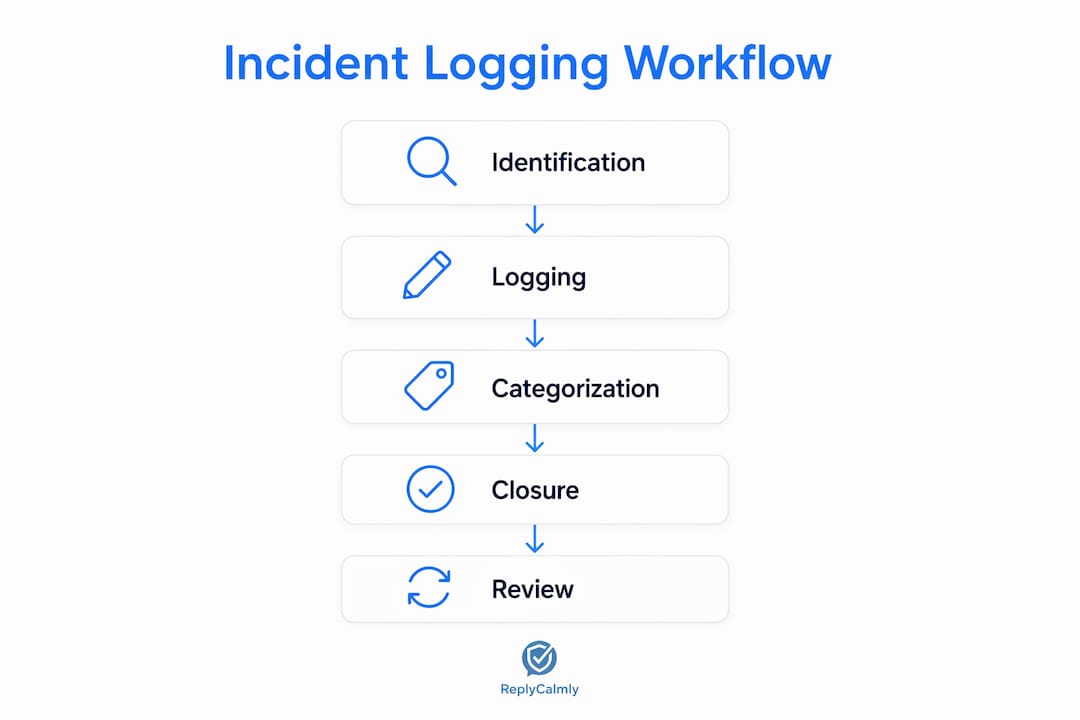
Closure/documentation. Write a short final summary for each entry and, per standard incident closure practices, confirm the record is complete before you close it. Note any follow-up action taken (e.g., "Sent written notice to co-parent via OurFamilyWizard at 7:02 PM EST").
Pro Tip: If you can't log immediately, record a 30-second voice memo with a timestamp. Transcribe it to your log within the hour and note "transcribed from voice memo" in the description field. Escalate to counsel if the incident involves a credible safety threat.
What fields and template should every entry include?
Five fields, defined precisely:
- Date/time with timezone: "March 4, 2026, 5:47 PM CST" — never just "Tuesday evening."
- Person involved: Full name and relationship, e.g., "Sarah Lee, co-parent."
- Neutral description: What happened in plain, factual language. Quote exact messages verbatim with source and timestamp. Avoid adjectives like "hostile" or "aggressive" unless quoting directly.
- Unique ID: Sequential ticket number (INC-001, INC-002). Never reuse or skip numbers.
- Supporting documentation: List every attached file by name and type (e.g., "screenshot_INC-004_OFW_March4.png").
| Field | Entry |
|---|---|
| Incident ID | INC-007 |
| Date/Time | March 4, 2026, 5:47 PM CST |
| Person Involved | Sarah Lee, co-parent |
| Description | Co-parent sent message via OurFamilyWizard at 5:47 PM CST: "I'm not bringing him back Sunday." No further explanation provided. Child was scheduled for return at 4:00 PM per court order dated January 10, 2026. Child missed soccer practice at 6:00 PM. |
| Category | Missed visitation / schedule violation |
| Supporting Docs | screenshot_INC-007_OFW_March4.png; court_order_Jan10.pdf |
Notice the description records the impact ("child missed soccer practice") alongside the occurrence. Courts give stronger weight to entries that document both what happened and its concrete effect on the child.
Pro Tip: Quote exact messages verbatim and label them clearly ("verbatim, OurFamilyWizard, 5:47 PM CST"). If a message contains private third-party information, note "[redacted — third-party name]" and keep the unredacted original in a secure file.
How do you collect and preserve supporting evidence correctly?
Capture evidence immediately. Take screenshots before closing any app, export message threads as PDF or CSV, and photograph physical evidence with your phone's timestamp visible. Attach each file to the corresponding incident entry by ID.
For storage and chain of custody:
- Save originals unedited. Never crop, annotate, or filter a screenshot you intend to use as evidence.
- Maintain original files and strict access controls — unencrypted or publicly shared cloud folders can be challenged in court.
- Record who accessed the evidence file and when (a simple access log in a separate note works).
- Export message threads as PDF rather than copying and pasting text, which strips metadata.
- Keep a read-only copy for counsel separate from your working log.
For format: preserve metadata by using forensic-friendly screenshots rather than edited images, and export messages directly from the platform when possible. Services like Traced specialize in capturing and preserving digital evidence in legal contexts if you need a more formal chain-of-custody record.
Pro Tip: If you use cloud storage, enable version history and restrict sharing to yourself and counsel. Keep an encrypted local backup on a device only you access.
How do you turn categorized logs into persuasive summaries?
Assign each entry one category and an optional severity tag (low, medium, high). Use the same category names every time. Consistent labels allow quick aggregation into trend charts and frequency summaries that attorneys and judges can read in minutes.
To build a one-page trend summary:
- Count incidents by category over the review period (e.g., "6 missed visitation incidents, March–May 2026").
- Note time patterns ("4 of 6 occurred on Sunday evenings").
- Pull two or three representative entries with IDs and attach them as exhibits.
- Add a one-sentence impact statement per pattern ("Child missed scheduled activities on four occasions").
Courts respond to pattern evidence rather than isolated incidents. A single missed pickup is a dispute; six missed pickups with timestamps, categories, and impact notes is a documented pattern. Keep your exhibit bundle to the most representative entries — quality over volume.
When should you log, and how should you write entries?
Log immediately or as soon as reasonably possible. Procrastination replaces objective facts with emotional impressions, which reduces evidentiary value. If a delay was unavoidable, note the reason directly in the entry: "Logged March 5, 2026, 9:00 AM CST. Delay due to medical appointment. Notes recorded on phone at time of incident."
Language rules that keep entries admissible:
- Use neutral verbs: "stated," "arrived," "sent," "did not respond" — not "screamed," "refused," "attacked."
- Record direct quotes verbatim with source and timestamp.
- Avoid conclusions without evidence: write "Co-parent arrived 47 minutes after scheduled pickup time" not "Co-parent deliberately ignored the schedule."
Weak: "He was aggressive and wouldn't cooperate as usual." Strong: "Co-parent arrived at 4:47 PM CST, 47 minutes after the 4:00 PM court-ordered pickup time. No advance notice was provided. Co-parent stated, 'I got here when I got here.' (Verbatim, in-person, March 4, 2026.)"
Pro Tip: Use Replycalmly's neutral response generator to draft replies before sending. A calm, documented reply becomes part of the record — and keeps you from writing something that looks bad in court.
What security and admissibility basics apply in U.S. family courts?
Prioritize secure storage and minimal sharing. U.S. family courts weigh how records were stored and produced, not just what they say. An unaltered, consistently maintained log carries far more credibility than one that shows signs of editing.
Practical security steps:
- Password-protect all exports before sharing with anyone.
- Use platforms with access controls and audit trails.
- Maintain unedited originals; produce read-only exports for counsel.
- Keep encrypted backups on a device only you control.
On admissibility: contemporaneous records are treated as more reliable than retrospective notes. Authenticity depends on showing the record was created at the time of the event and has not been altered. Chain of custody means you can account for who created, accessed, and exported the file. Keep entries factual and cite source material (the platform, the message thread, the court order) to limit hearsay objections. For detailed guidance on documentation in custody cases, the way judges and counsel actually use these records is worth understanding before your next hearing.
Pro Tip: Retain a read-only export for counsel and keep a separate access log noting every time you opened, exported, or shared the file.
This article is general information, not legal advice. Confirm current evidentiary rules and admissibility standards with a licensed family law attorney in your state.
What are the most common logging mistakes and how do you fix them?
- Delayed logging: Add a note explaining the delay and attach any contemporaneous evidence (a text you sent at the time, a calendar entry). Don't pretend the delay didn't happen.
- Emotional language: Do a batch review of existing entries and replace subjective adjectives with factual descriptions. "Hostile tone" becomes "raised voice, stated [verbatim quote]."
- Missing or duplicate IDs: Audit your log, assign missing IDs in sequence, and note the correction with a date stamp.
- Scattered evidence: Consolidate all files into one folder named by incident ID. Update the supporting documentation field in each entry to match.
- Insecure storage: Move files to a password-protected or encrypted location immediately and revoke any shared access links.
If an incident involves a credible threat to your safety or your child's safety, stop self-correcting and call counsel or law enforcement. Documentation matters, but it comes second to immediate safety.
How do you package logs and exhibits for counsel or court?
Produce a short exhibit bundle: a one-page summary, representative incident entries with IDs, and original evidence files in read-only format. Your step-by-step documentation guide covers the full packaging process, but here's the core checklist:
- Select the most representative incidents (aim for 5–10 per pattern).
- Create a chronological index listing each incident ID, date, category, and one-line description.
- Attach original files (screenshots, PDFs) labeled by incident ID (e.g., "Exhibit A — INC-007 — screenshot_OFW_March4.png").
- Write a one-page narrative timeline connecting the pattern to the relevant court order or custody agreement.
- Number exhibits sequentially and create an exhibit map that references each incident ID.
For file formats: PDF for message exports and summaries, PNG or JPG for screenshots (unedited), and a master spreadsheet or CSV as the index. Keep a discovery-ready export folder that mirrors exactly what you'd hand to counsel.
Pro Tip: Before your first meeting with counsel, prepare a one-page summary of categories, frequency, and dates. Attorneys bill by the hour — a clear summary saves time and money.
Key Takeaways
A court-ready incident logging workflow requires five mandatory fields, immediate capture, centralized storage, consistent categorization, and regular review to build the pattern evidence that counsel and courts find persuasive.
| Point | Details |
|---|---|
| Five mandatory fields | Every entry needs date/time with timezone, person involved, neutral description, unique ID, and supporting documentation. |
| Log immediately | Delay replaces objective facts with emotional impressions, weakening evidentiary value. |
| Centralize and categorize | One location with consistent category labels (missed visitation, abusive language, etc.) enables trend summaries courts find persuasive. |
| Preserve originals | Never edit source files; maintain read-only exports for counsel with an access log. |
| Replycalmly supports this workflow | Replycalmly handles neutral reply drafting, incident tagging, centralized tracking, and secure export for exhibit preparation. |
Why a calm, systematic approach to logging actually works
The conventional advice is to "document everything." That's not wrong, but it misses the more important shift: moving from participant to observer. When you treat each incident as a record to be filed rather than a grievance to be felt, the entries get shorter, cleaner, and far more useful to counsel.
A repeatable, structured workflow reduces chaos and produces defensible records precisely because it removes the decision-making from each individual incident. You're not deciding how to respond emotionally — you're following a procedure. That consistency is what makes a log credible over months of entries.
Consider the difference between a folder of forwarded emails with angry annotations and a structured log with 40 entries, each carrying an ID, a category, a neutral description, and an attached screenshot. Both contain the same underlying facts. Only one of them tells a coherent story to a judge who has 10 minutes to review your case.
Replycalmly makes this workflow faster and less stressful
High-conflict co-parenting documentation is exhausting when you're doing it manually. Replycalmly is one practical option for co-parents who want the workflow described in this article without building it from scratch in a spreadsheet.

The platform covers the steps that drain the most time: it drafts neutral, court-appropriate replies so your responses stay clean and documented, tags incidents by category automatically, and keeps everything in a centralized log you can export for counsel. It also integrates with OurFamilyWizard, so it works alongside court-mandated tools rather than replacing them.
If you're preparing for an upcoming hearing or just starting to build your record, the co-parenting communication hub is the right starting point. You can also use the free response generator right now to draft a neutral reply to any message you've received today.
Useful sources and next steps
- Incident Management Workflow — Atlassian: industry-standard lifecycle framework (identification, logging, categorization, closure) adapted for this guide.
- Incident Tracking Software — SolarWinds Web Help Desk: source for mandatory fields and centralized logging best practices.
- Incident Reporting and Resolution — Process Street: evidence preservation and chain-of-custody guidance.
- Incident Management Workflow Best Practices — PagerDuty: repeatable workflow principles and closure documentation.
- Co-parenting incident logging guide — Replycalmly: foundational article on why neutral, contemporaneous logging matters for U.S. family courts.
- Incident tracking workflow for court — Replycalmly: practical guide to court submission formats and exhibit preparation.
- Parenting incident tracking checklist — Replycalmly: printable checklist for urgent situations.
Suggested next steps: Export your current log as a read-only PDF and send it to counsel. Schedule a category review every 30–90 days to catch emerging patterns before your next hearing. If you haven't started a log yet, open a new document right now and create your first entry using the five fields above.