
A custody communication dashboard is a centralized digital platform that consolidates scheduling, secure messaging, expense tracking, and documentation between co-parents into one shared system. If you are navigating a custody dispute, understanding what is custody communication dashboard technology means understanding your single most powerful tool for reducing conflict and building a court-ready record. Platforms like OurFamilyWizard, TalkingParents, and AppClose have made this category the standard in family court settings. These tools do not just organize your co-parenting life. They create a permanent, verifiable paper trail that protects you when disputes escalate.
What is a custody communication dashboard and why does it matter?
A custody communication dashboard is defined as a dedicated software platform that consolidates scheduling, messaging, expenses, and documents into a single shared system accessible by both parents. That consolidation removes the gaps that destroy co-parenting coordination: the missed text, the disputed phone call, the receipt that disappeared.
The core value is accountability. Every message sent through platforms like OurFamilyWizard or TalkingParents carries a timestamp and cannot be edited after sending. That permanence matters in court. A judge reviewing a custody dispute wants facts, dates, and documented patterns. A screenshot of a text message can be cropped or altered. A record from a court-accepted custody management software platform cannot.

These dashboards also serve as emotional guardrails. When both parents know every word is logged and potentially reviewable by a lawyer or judge, the tone of communication shifts. Hostility drops. Focus moves toward the child. That behavioral change is one of the most underappreciated benefits of custody dashboards.
What features and benefits do custody communication dashboards provide?
The features of communication dashboards fall into five practical categories, each solving a specific co-parenting problem.
- Shared calendar and parenting time scheduling. Both parents see the same schedule in real time. Changes are logged with timestamps, so "I never agreed to that" becomes impossible to claim.
- Secure, timestamped messaging. Secure messaging keeps records permanent and uneditable, eliminating disputes about who said what and when. TalkingParents uses digital signatures to guarantee message integrity.
- Expense tracking with receipts. Parents upload receipts, log shared costs, and generate reports. This feature alone prevents dozens of arguments per year about who paid for what.
- Document storage. Medical records, school reports, and legal documents sit in one place, accessible to both parents and any authorized professional.
- AI-powered tone moderation. OurFamilyWizard and TalkingParents offer Tone Meters that detect hostile language in messages before they are sent. The BestInterest app takes this further by neutralizing harmful messages and suggesting peaceful rewrites.
The behavioral benefit is real. Archived, reviewable communication tends to improve parental professionalism because both parties know the record exists. You write differently when you know a family court judge might read it.
Pro Tip: Before sending any message through your custody communication platform, read it aloud as if your child's attorney is listening. If it sounds defensive or accusatory, use the platform's tone tool to rewrite it.
How do top custody dashboards compare in features and court acceptance?
Choosing the right platform depends on your conflict level, your court's requirements, and your budget. Here is how the leading tools stack up.
| Platform | Key features | Court acceptance | AI moderation | Cost |
|---|---|---|---|---|
| OurFamilyWizard | Calendar, messaging, expenses, professional access | Widely court-ordered | Tone Meter | Paid subscription |
| TalkingParents | Call recording, secure messaging, document storage | Court-accepted records | Sentiment Scanner | Free and paid tiers |
| AppClose | Messaging, calendar, expense tracking | Court-recognized | Limited | Free |
| BestInterest | AI message filtering, peaceful response suggestions | Emerging acceptance | Full AI rewrite | Paid |
| Splitifi Command | Case management, custody logs, motion tracking | Legal tool context | 24/7 AI guidance | Paid |
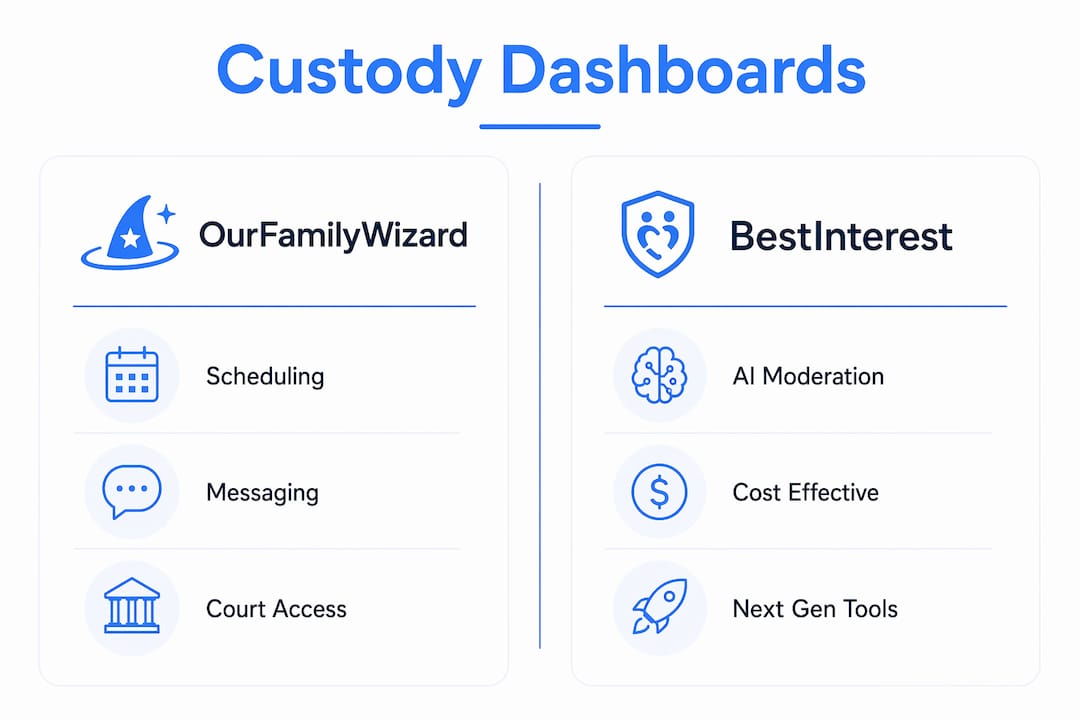
OurFamilyWizard is the most widely court-ordered custody platform in the United States. Its professional access feature lets lawyers and mediators log in directly to review communication records, which reduces legal fees and speeds up case management. TalkingParents differentiates itself with call recording, a feature that matters in high-conflict situations where phone conversations become disputed. AppClose is the most accessible entry point because its core features are free, making it practical for parents with limited budgets.
The BestInterest app represents the next generation of custody communication tools. Its AI filters pause and rewrite messages that contain hostile language before they are ever sent. That secondary pause is where real conflict reduction happens. Splitifi Command sits in a different category entirely, functioning more as full case management software that tracks motions, deadlines, and custody logs alongside communication.
When choosing, ask your attorney whether your court has a preferred or mandated platform. Many family courts in the United States now specify OurFamilyWizard or TalkingParents in custody orders. Using the wrong platform could mean your records carry less weight. You can also review a detailed breakdown of top documentation apps to compare options before committing.
How to use custody communication effectively every day
Knowing how to use custody communication tools is different from simply having access to them. Most parents set up an account and then underuse the platform, missing the documentation benefits entirely.
- Set up the shared calendar completely on day one. Enter every scheduled exchange, school event, medical appointment, and holiday. Gaps in the calendar create gaps in your record.
- Keep every message factual and child-focused. Write "The school pickup on Tuesday is at 3:15 p.m." not "You always forget pickup times." Factual messages build a stronger legal record.
- Use the tone tool before every send. AI moderation tools are most effective when used proactively, not after a conflict has already started. The BestInterest app's AI filter gives you a moment to reconsider before a message becomes part of your permanent record.
- Document incidents with objective notes. Log dates, times, and specific actions. Avoid emotional language. Court-admissible records focus on objective facts like dates, times, and actions rather than emotional narratives.
- Invite your attorney or mediator to access your records. Practitioner accounts in OurFamilyWizard let professionals review your communication logs directly. This reduces the time your lawyer spends reconstructing events and lowers your legal fees.
- Build a communication plan around the platform. Agree with your co-parent on response time expectations, which topics belong in the app versus in person, and how schedule changes get requested. A written co-parenting communication plan removes ambiguity before it becomes conflict.
Pro Tip: Never document your emotional reaction to a co-parent's behavior. Document the behavior itself: the date, the action, and the impact on your child's schedule or welfare. Emotional narratives weaken court records.
What challenges do custody dashboards help parents overcome?
High-conflict co-parenting creates predictable problems. Custody communication tools are built to address each one directly.
- Hostile message exchanges. AI tone moderation catches aggressive language before it is sent. The result is a communication record that reflects professionalism, not conflict.
- Disputed schedule changes. Every change request and response is logged with a timestamp. "I never received that message" is no longer a viable defense.
- Lost receipts and expense disputes. Centralized expense tracking with uploaded receipts creates a financial record both parents can see. Disputes about shared costs drop significantly.
- A co-parent who resists digital tools. This is the most common practical challenge. If your court has mandated a specific platform, non-compliance becomes a legal issue, not just a personal preference. Document your co-parent's refusal to use the platform as part of your record.
- Inconsistent documentation. Parents who document sporadically produce records with gaps that opposing attorneys exploit. Consistent daily use of the platform is what creates a credible, complete record.
The importance of custody tracking becomes clearest when a case goes back to court. A parent with 18 months of consistent, factual records in OurFamilyWizard or TalkingParents walks into that hearing with a significant advantage. A parent relying on memory and screenshots does not. Understanding why documentation protects your case is the first step toward building that advantage.
Key takeaways
A custody communication dashboard is the most effective single tool for reducing co-parenting conflict, building court-ready records, and protecting your parental rights throughout a custody dispute.
| Point | Details |
|---|---|
| Definition matters | A custody communication dashboard consolidates messaging, scheduling, expenses, and documents into one court-accepted platform. |
| AI moderation changes behavior | Tone Meters and AI filters in OurFamilyWizard and BestInterest reduce hostile messages before they become part of your record. |
| Court acceptance varies by platform | OurFamilyWizard and TalkingParents are most widely court-ordered; confirm your court's preference before choosing. |
| Objective documentation wins cases | Log dates, times, and actions only. Emotional narratives weaken the legal value of your records. |
| Professional access saves money | Inviting your attorney into your platform's records reduces reconstruction time and lowers legal fees. |
Why I think most parents underestimate these tools
I have seen parents treat custody communication dashboards as a formality, something they set up because the court told them to and then barely use. That is a serious mistake. The parents who get the most out of these platforms are the ones who treat every entry as a potential exhibit.
What surprises most people is the emotional benefit. When you know the platform is capturing everything, you stop trying to win arguments in real time. You write shorter, calmer messages. You stop responding to bait. That shift is not just good for your legal case. It is genuinely better for your mental health and for your child.
The AI moderation features are where I see the biggest underuse. Most parents discover the tone tool after they have already sent a message they regret. Using it proactively, before every send, is what separates parents who build clean records from parents who hand the other side ammunition.
One thing I want to be direct about: these tools are not a substitute for empathy. A co-parenting relationship that functions well, even minimally, is better for your child than one where every interaction is treated as a legal transaction. Use the dashboard to protect yourself. Do not use it to manufacture conflict. The courts notice the difference, and so do your kids.
— Devin
How Replycalmly helps you communicate with confidence
Managing a custody dispute is hard enough without worrying whether every message you send could be used against you. Replycalmly is built specifically for that problem.

The platform's AI response generator produces calm, firm, and legally appropriate replies to difficult co-parent messages. You paste in what you received, and Replycalmly gives you multiple response options, each calibrated for tone and court appropriateness. The incident tracking system logs patterns over time and visualizes them in a dashboard that complements platforms like OurFamilyWizard without replacing them. If you are ready to take control of your co-parenting communication, start with Replycalmly's co-parenting communication hub or try the free response generator today.
FAQ
What is a custody communication dashboard?
A custody communication dashboard is a digital platform that consolidates co-parent messaging, scheduling, expense tracking, and document storage into one secure, court-admissible system. Platforms like OurFamilyWizard and TalkingParents are the most widely recognized examples.
Are custody dashboard records admissible in family court?
Records from platforms like OurFamilyWizard and TalkingParents are accepted in family courts across the United States because they produce timestamped, uneditable communication logs. Many courts now mandate their use in custody orders.
What does an AI tone meter do in a custody app?
An AI tone meter scans your message before you send it and flags language that reads as hostile or legally damaging. OurFamilyWizard and TalkingParents both offer this feature to help parents maintain a professional communication record.
Can my lawyer access my custody communication dashboard?
Yes. OurFamilyWizard offers practitioner accounts that allow attorneys and mediators to log in and review your communication records directly. This reduces the time spent reconstructing events and can lower your overall legal costs.
What if my co-parent refuses to use the custody communication app?
If your court has mandated a specific platform, your co-parent's refusal is a legal compliance issue. Document the refusal with dates and report it to your attorney. Non-compliance with a court order carries its own legal consequences.