
If you need AI-guided messaging support and court-ready documentation right now, the strongest getpeaceparents.com alternatives are Replycalmly, OurFamilyWizard, TalkingParents, Peaceful CoParenting Messenger, and Two Paths. Each covers a different slice of the high-conflict co-parenting problem, so the right pick depends on whether your priority is AI response coaching, tamper-proof call records, or a free entry point.
- Replycalmly generates calm, firm, or short reply variations for any message you receive, tracks incidents with category tags, and exports court-appropriate reports. Best for co-parents who need AI-guided de-escalation plus a documentation record they can hand to an attorney.
- OurFamilyWizard is the most court-familiar platform in the U.S. Judges and attorneys name it in custody orders more often than any other app, and its certified exports meet the unalterable, timestamped standard courts prefer.
- TalkingParents records phone and video calls with transcripts that become part of the legal record, which matters when a co-parent routinely denies conversations happened.
- Peaceful CoParenting Messenger is free to sign up and use, offers tamper-proof message logs, and lets you cap how many messages you receive per day — a practical boundary tool for high-conflict situations.
- Two Paths and PeacePath both position on conflict reduction, though neither offers the AI response-generation depth that Replycalmly does.
True free plans are now rare. AppClose ended its free tier in early 2026, and TalkingParents retired its free plan shortly thereafter. Peaceful CoParenting Messenger remains genuinely free at the base level.
Pro Tip: If your case is in active litigation and a court order already names a specific app, keep using that app. Confirm with your attorney before switching to any new tool, even a better one.
Table of Contents
- How do these getpeaceparents.com alternatives compare feature by feature?
- Which app fits your specific situation?
- How do you choose the right app for a high-conflict situation?
- Why AI-guided messaging and structured documentation actually matter
- Key Takeaways
- The real gap most co-parenting apps leave open
- Replycalmly gives you the AI coaching and documentation these apps don't
- Sources behind this comparison
How do these getpeaceparents.com alternatives compare feature by feature?
The table below maps each platform against the dimensions that matter most in high-conflict custody situations.
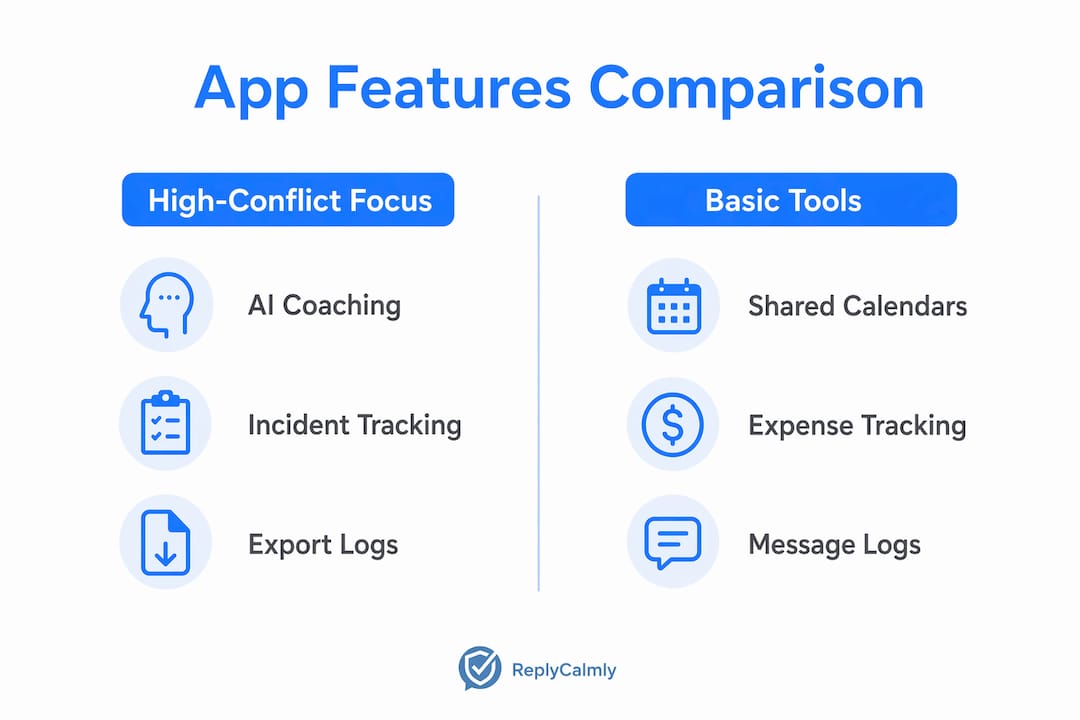
| Feature | Replycalmly | OurFamilyWizard | TalkingParents | Peaceful CoParenting Messenger | Two Paths / PeacePath | AppClose | 2Houses | Coparently | Custody X Change |
|---|---|---|---|---|---|---|---|---|---|
| AI-guided messaging / response coach | ✓ Calm, firm, short variants | ✗ | ✗ | ✗ | Limited prompts | ✗ | ✗ | ✗ | ✗ |
| Court-ready exports / certified records | ✓ PDF court reports | ✓ Certified standard | ✓ Certified standard | ✓ PDF export | Limited | ✓ Standard | ✓ Standard | Limited | ✓ Parenting plan docs |
| True free plan / trial | Free AI generator + 3-day trial | ✗ | ✗ | ✓ Free base tier | Limited free | ✗ (paid since Jan 2026) | Limited trial | Limited trial | Limited trial |
| Pricing (monthly / yearly shape) | $19/mo after trial | — | — | Free / premium upgrade | Varies | — | Varies | Varies | One-time or subscription |
| Encryption & data policy | Bank-level; does not sell data | Encrypted | Encrypted | Tamper-proof logs | Not publicly detailed | Encrypted | Encrypted | Not publicly detailed | Encrypted |
| Solo-use (co-parent signup required?) | ✓ Solo use available | ✗ Both parents required | ✗ Both parents required | ✗ Both parents required | ✗ Both parents required | ✗ Both parents required | ✗ Both parents required | ✗ Both parents required | ✓ Solo parenting plan |
| Incident tracking / analytics / dashboards | ✓ Tagged categories, pattern dashboards | Limited | Limited | ✗ | ✗ | ✗ | Limited | ✗ | ✗ |
| Platform support | iOS / Android / Web | iOS / Android / Web | iOS / Android / Web | iOS / Android | iOS / Android | iOS / Android / Web | iOS / Android / Web | iOS / Android / Web | iOS / Android / Web |
| Notable extras | Decree violation detection, child scripts, message templates | Expense tracking, family calendar | Accountable Calling (recorded calls) | Message frequency limits, canned responses | Conflict-reduction focus | Expense tracking, in-app payments | Expense tracking, bilingual support | Shared calendar | Parenting plan builder |
Key trade-offs for high-conflict scenarios:
- Replycalmly is the only option with AI-generated reply variations and solo-use incident tracking. You do not need your co-parent to sign up to start building a record.
- OurFamilyWizard carries the strongest court incumbency. If your attorney is already familiar with it, that familiarity has real value in litigation.
- TalkingParents' Accountable Calling feature is unique. No other app on this list records and transcribes calls into the legal record automatically.
- Peaceful CoParenting Messenger's free tier is the most accessible entry point, but it lacks AI coaching and incident analytics.
- Custody X Change solves a different problem: parenting plan drafting, not daily communication management.
Which app fits your specific situation?
Replycalmly
Replycalmly is built specifically for co-parents who are already in conflict and need two things at once: a way to respond without escalating, and a paper trail that holds up. The AI response generator takes the message you received and produces calm, firm, or short reply options. You pick the one that fits the moment. Behind that, the incident tracker logs each event with category tags (custody conflict, manipulation, false accusations, decree violations), attaches evidence, and visualizes patterns over time through dashboards. Those pattern dashboards are what attorneys actually want: they show trends, not just isolated screenshots.
Best for: Co-parents in active or anticipated litigation who need AI-guided de-escalation and a court-exportable incident record, and who cannot or will not require the other parent to sign up for the same platform.
- ✓ Only platform with AI reply generation (calm / firm / short)
- ✓ Solo use — no co-parent signup needed
- ✓ Incident analytics and pattern dashboards for attorney prep
- ✗ Newer platform; less court-name recognition than OurFamilyWizard
- ✗ Full feature set requires subscription after 3-day trial
OurFamilyWizard
OurFamilyWizard is the default recommendation when a court order is already in place or likely. Judges and attorneys in the U.S. name it in custody orders more often than any other app. Its message logs, calendar, and expense tracking are all exportable in a certified format that courts accept without authenticity disputes. The annual cost varies per parent depending on tier.
Best for: Co-parents whose case is in active litigation or whose attorney specifically recommends a court-familiar platform.
- ✓ Highest court-name recognition in the U.S.
- ✓ Certified, tamper-proof exports
- ✓ Expense tracking and shared calendar
- ✗ No AI response coaching
- ✗ Both parents must sign up; no solo mode
TalkingParents
The Accountable Calling feature is what sets TalkingParents apart. Every phone and video call is recorded and transcribed, and those transcripts become part of the legal record. If your co-parent denies conversations happened or claims they said something different, that argument disappears. Pricing varies per parent per year depending on tier.
Best for: High-conflict situations where verbal communication is a source of dispute and you need an unalterable call record.
- ✓ Recorded, transcribed calls as legal evidence
- ✓ Certified message exports
- ✗ No AI message coaching
- ✗ Free plan retired March 2026
Peaceful CoParenting Messenger
Free at the base level, which makes it the most accessible option on this list. You can cap how many messages you receive per day, set a waiting period between messages to reduce back-and-forth hostility, and restrict your co-parent to pre-written canned messages for common topics like pickups and medical appointments. PDF exports are available for court use.
Best for: Co-parents on a tight budget who need basic boundary-setting tools and a tamper-proof message log without paying a monthly fee.
- ✓ Genuinely free base tier
- ✓ Message frequency and timing controls
- ✗ No AI response coaching or incident analytics
- ✗ Both parents must sign up
Two Paths and PeacePath
Both apps position on conflict reduction and are worth considering if your situation is moving toward resolution rather than deeper litigation. Neither offers AI-generated reply coaching at the depth Replycalmly does, and their export formats are less established with attorneys. PeacePath specifically targets high-conflict situations and includes some boundary-setting tools.

Best for: Co-parents in lower-intensity conflict who want a structured communication channel without the full documentation infrastructure.
2Houses and Coparently
2Houses is the strongest option for international or bilingual co-parents, with multilingual support and expense tracking built in. Coparently covers the basics: shared calendar, messaging, and expense logs. Neither offers AI coaching or incident analytics.
Custody X Change
Custody X Change is a parenting plan builder, not a daily communication tool. It helps you draft, modify, and store parenting plans and custody schedules. If your dispute centers on the plan itself rather than day-to-day messaging, it fills a gap the other apps do not.
Pro Tip: Incident tagging and pattern visualization give attorneys trend evidence rather than isolated screenshots. Before your next attorney meeting, export a pattern report and ask your lawyer whether it supports your current filing.
How do you choose the right app for a high-conflict situation?
Work through this checklist before committing to any platform.
- Check whether your court order names a specific app. If it does, that app is your primary tool. You can supplement with Replycalmly for AI response coaching and incident tracking, but do not abandon the court-named platform. Confirm with your attorney before switching anything in active litigation.
- Decide whether you need solo-use capability. If your co-parent refuses to sign up for a shared platform, you need a tool that works without their participation. Replycalmly and Custody X Change both support solo use.
- Verify the export format. Courts prefer unalterable, timestamped exports — PDF with metadata or certified logs — over screenshots or pasted transcripts. Ask the vendor: "Can you show me a sample export? Is it tamper-evident and timestamped?" A vendor who cannot answer that clearly is a red flag.
- Read the data policy before you enter a single message. Look for an explicit statement that the vendor does not sell personal data, and a specific encryption claim (bank-level or AES-256). If that statement is hard to find, treat it as a warning. A clear privacy policy is a baseline requirement, not a bonus feature.
- Test customer support before you need it. Send a pre-sales question and time the response. High-conflict situations do not wait for business hours. Apps that provide responsive support and explicit escalation channels are meaningfully more reliable when things go wrong.
- Confirm platform availability. If you primarily use Android and the app is iOS-only, that is a practical disqualifier regardless of features.
- Understand the true cost. True free tiers are now rare. Budget for a subscription and compare annual cost per parent, not just the monthly headline price.
Red flags that should disqualify an app:
- No explicit statement about data selling
- No specific encryption claim
- Exports are screenshots only, with no metadata or certification
- No solo-use option when your co-parent is uncooperative
- Customer support response time measured in days, not hours
Pro Tip: When presenting app records to a court or attorney, export the full log in PDF format, note the export date and the platform name on a cover page, and ask your attorney to review the file before filing it. Courts accept properly exported, tamper-evident records in most U.S. jurisdictions, but your attorney needs to confirm the format works in your specific court.
Why AI-guided messaging and structured documentation actually matter
The case for AI-guided messaging is not just about convenience. Dr. Laura Markham emphasizes that tools supporting emotional regulation before communication help parents shift from reactive to child-centered responses. That shift is what breaks the conflict cycle. When you are handed three pre-written reply options instead of a blank text field, the pause itself is the intervention.
Gottman Parenting materials reinforce this: effective de-escalation relies on calm wording, clear requests, and firm limits — exactly the structure an AI response coach applies. The difference between a reactive reply and a coached one is stark:
- Reactive: "You're always late. I'm documenting this."
- AI-guided: "The pickup time in our parenting plan is 3:00 PM. Please confirm your arrival time."
The second message says the same thing legally, but it removes the emotional charge that invites escalation.
On the documentation side, incident dashboards that group and tag events reduce the time attorneys spend building court exhibits and make behavioral trends visible in a way that isolated screenshots cannot. A single late pickup is an anecdote. Seventeen late pickups tagged, timestamped, and visualized on a frequency chart is evidence.
Courts accept properly exported, tamper-evident records in most U.S. jurisdictions. The key requirement is that logs be unalterable and clearly timestamped — practice notes consistently show that authenticity disputes arise from screenshots and pasted transcripts, not from certified platform exports.
True free tiers have largely disappeared from the category. AppClose moved to a paid model on January 1, 2026, and TalkingParents followed in March 2026. That shift reflects the real cost of secure infrastructure. When evaluating a free option, prioritize clear data policies over the price tag.
These tools fit attorney workflows best when exports are prepared before meetings, not during them. Pull a pattern report, attach the relevant incident logs, and let your attorney review the file in advance. That preparation shortens billable hours and strengthens the narrative your attorney presents.
Key Takeaways
For high-conflict co-parents, the right alternative to getpeaceparents.com combines AI-guided de-escalation with tamper-proof, court-exportable documentation — and Replycalmly is the only option on this list that delivers both with solo-use capability.
| Point | Details |
|---|---|
| AI coaching is the differentiator | Only Replycalmly generates calm, firm, or short reply variants; all other apps require you to write your own messages. |
| Court exports must be tamper-evident | Certified, timestamped PDFs are what courts accept; screenshots and pasted transcripts invite authenticity disputes. |
| True free plans are rare in 2026 | AppClose and TalkingParents both ended free tiers in early 2026; Peaceful CoParenting Messenger remains the only genuinely free option. |
| Solo use matters in high-conflict cases | If your co-parent refuses to sign up, only Replycalmly and Custody X Change let you build a record without their participation. |
| Replycalmly for AI + documentation | Replycalmly's free AI response generator and 3-day trial let you test the full system before committing to the $19/month subscription. |
The real gap most co-parenting apps leave open
Most co-parenting apps were built to organize logistics: shared calendars, expense splits, message logs. That is useful, but it misses the hardest part of high-conflict co-parenting. The problem is not that parents lack a shared calendar. The problem is that one message from a difficult co-parent can send you into a reactive spiral that produces a reply you will regret in court six months later.
Documentation tools are only part of a healthy approach. Nurturing Parenting Programs from Family Development Resources make this point directly: pairing documentation with trauma-informed parenting practices produces better outcomes than documentation alone. A log of every violation is not a co-parenting strategy. It is evidence. The strategy is reducing the emotional cost of the conflict while you build that record.
That is why the AI response coach matters more than it might appear on a feature checklist. It is not a shortcut. It is a structural pause between receiving a hostile message and sending a reply that could hurt your case. Used ethically, documentation supports child welfare and legal clarity. Used as a harassment tool — logging trivial interactions to manufacture a pattern — it backfires and damages credibility with judges. If the conflict has reached a point where communication itself feels unsafe, a therapist or family law attorney should be part of the picture, not just an app.
Replycalmly gives you the AI coaching and documentation these apps don't
Every app on this list handles part of the problem. Replycalmly handles the part that matters most for high-conflict co-parents: what you say next, and whether it holds up in court.

The AI response generator produces calm, firm, or short reply options for any message you receive. The incident tracker logs each event with category tags, attached evidence, and pattern dashboards your attorney can read in minutes. Court-appropriate PDF reports are exportable on demand. And because Replycalmly works in solo mode, you do not need your co-parent's cooperation to start building a record today.
The free AI response generator is available without a subscription. The full documentation system, including incident tracking, pattern dashboards, and court-ready exports, unlocks after a 3-day free trial at $19/month. If your case is in active litigation, confirm with your attorney before relying on any new tool as your primary record. Start your free trial at replycalmly.com.
Sources behind this comparison
| Source | What it supports |
|---|---|
| Dr. Laura Markham — Peaceful Parent Happy Kids | Clinician basis for AI-guided emotional regulation before messaging |
| Gottman Parenting — The Gottman Institute | Evidence-based de-escalation scripts that map to AI coaching principles |
| Family Development Resources — Nurturing Parenting Programs | Recommendation to pair documentation with trauma-informed parenting practices |
| Peaceful CoParenting Messenger | Feature details: free tier, tamper-proof logs, message frequency controls, PDF export |
| ReplyCalmly — How to Document Co-Parent Behavior | Court export standards: unalterable, timestamped PDFs vs. screenshots |
| ReplyCalmly — Privacy in Co-Parenting Platforms | Privacy checklist: data-selling statements and encryption requirements |
| ReplyCalmly — Court Order Violations | Practitioner advisory: keep court-named tool during active litigation |
| ReplyCalmly — Incident Analytics | Value of pattern dashboards and incident tagging for attorney case prep |
| Boys Town Parenting | Authoritative parenting support resource; background on family relationship guidance |
This article provides general information about co-parenting communication tools and is not legal or therapeutic advice. Confirm any tool's suitability for your specific case with a licensed family law attorney or qualified mental health professional.