
Incident visualization turns raw message logs, timestamps, and communication records into a simple visual — usually a timeline or causality map — that shows who did what, in what order, and why it matters. For family court, that means a judge or attorney can reconstruct a pattern of behavior in minutes instead of wading through hundreds of screenshots. Start right now: preserve your original messages without editing them, export metadata (sender ID, delivery receipts, timestamps), and open a dated incident log. Replycalmly's tracking system handles all three automatically, and it integrates with OurFamilyWizard so court-mandated communication records stay intact.
- Preserve originals: never crop, annotate, or alter screenshots before saving them.
- Export metadata: delivery receipts, read receipts, and sender IDs are as important as the message text.
- Start a dated log: record each incident the day it happens, not weeks later from memory.
- Assign evidence IDs immediately (EVID-001, EVID-002) so every file has a unique name.
Pro Tip: Set a recurring weekly reminder to export and back up your message logs. Gaps in the record are one of the first things opposing counsel will point out.
Table of Contents
- What does incident visualization actually look like?
- Why does visualization matter in family court?
- What must every court-ready visualization include?
- How do you build an incident visualization step by step?
- How should you present visuals to your attorney or a judge?
- U.S. admissibility and privacy basics you must know
- Sample timeline and template fields
- Common mistakes that undermine your credibility in court
- How long does this take, and what does it cost?
- Key Takeaways
- What the ReplyCalmly team has learned from building this
- Replycalmly makes this faster and more court-ready
- Where to learn more
What does incident visualization actually look like?
Effective visualizations use chronological timelines with color-coding by severity and direct links to source evidence. For custody cases, four formats cover most situations:
- Linear timeline: A left-to-right sequence of dated events. Example: a timeline showing five late pickups over 90 days, each linked to a screenshot of the co-parent's message that day.
- Causality map: A branching diagram that shows how one event triggered the next. Example: a single threatening message that led to a police call, a missed exchange, and a decree violation filing.
- Activity heatmap: A calendar grid color-coded by incident frequency. Example: a month-view showing that communication breakdowns cluster on Sunday evenings before school-week exchanges.
- Pattern dashboard: A summary view combining frequency charts, category tags, and severity scores across a date range. Replycalmly's dashboard does this automatically.
Pro Tip: Pick the smallest format that answers one specific question. A single-page timeline beats a 12-slide deck every time — small, focused visuals tied to a single question are more persuasive to non-technical reviewers like judges.
Why does visualization matter in family court?
Visualizing causality moves a dispute from debate-driven arguments to fact-based documentation by showing strict chronological sequences and triggers. Without it, both parents tell competing stories. With a timestamped visual, the sequence speaks for itself.
Courtroom benefits judges and attorneys actually rely on:
- Clarifies the exact sequence of events so the judge doesn't have to reconstruct it from raw messages.
- Shows patterns of behavior across time — clusters and frequency — that isolated screenshots never reveal.
- Reduces "he said/she said" by grounding every claim in a timestamped, linked original.
- Speeds attorney review: a one-page timeline with an evidence index takes minutes to scan.
- Documents decree violations in context, not as isolated complaints.
What judges look for specifically: preserved timestamps and metadata, direct links to original messages or attachments, a clear legend, and a chain-of-custody note explaining how the evidence was obtained and stored. Understanding what judges look for in custody cases is the foundation for building documentation that actually holds up.
What must every court-ready visualization include?

Court-ready documentation must include the initiating event, the sequence of subsequent actions, and links to original evidence. Use this table as your checklist.
| Field | What to capture | Example |
|---|---|---|
| Initiating event | The first message or action that started the incident | "Text received 3/14 at 6:02 PM" |
| Timestamp | Exact date, time, and time zone | March, 2026 — |
| Actor | Who sent or did what | Co-parent A (sender), Co-parent B (recipient) |
| Message excerpt | Verbatim text, no paraphrasing | "You'll never see them again." |
| Evidence ID | Unique file name assigned at export | EVID-005 |
| Attachment link | Screenshot, audio file, or exported log | EVID-005_screenshot.pdf |
| Metadata | Sender ID, delivery receipt, read receipt | Delivered —, Read — |
| Preservation note | How and when the item was exported | Exported via OurFamilyWizard on 3/15/2026 |
| Decree clause | Which custody order provision was violated | Section — — communication restrictions |
Pro Tip: Every visual point should link to a uniquely named evidence file. Keep a separate index page (EVID-001 → original_file_name) and attach it to every submission. Your evidence log is the backbone of the whole record.
How do you build an incident visualization step by step?
Manual workflow
- Collect raw messages: export full conversation threads, not individual screenshots.
- Screenshot or export originals without cropping or annotation.
- Record exact timestamps and metadata for each item.
- Assign evidence IDs in order (EVID-001, EVID-002...).
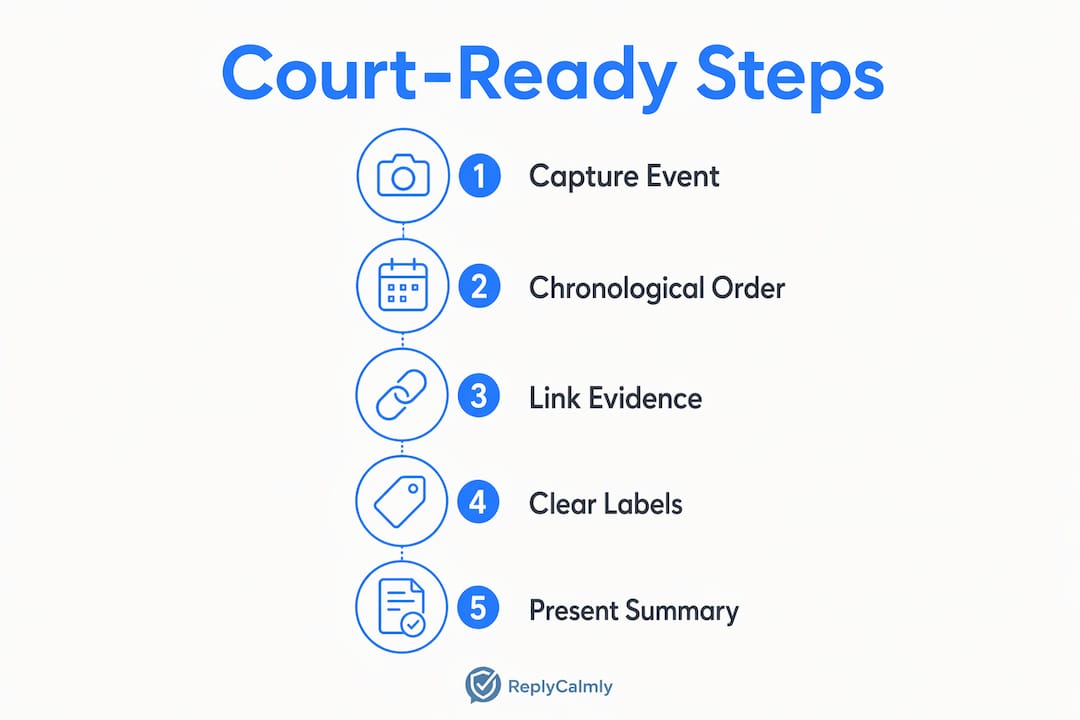
- Arrange events strictly chronologically.
- Annotate causality: note which event triggered the next and what the outcome was.
- Attach the evidence index to each visual point.
- Export the finished visualization as a PDF with the index appended.
This incident logging workflow covers each step in detail, including preferred file formats and metadata export methods.
Platform-assisted workflow with Replycalmly
- Import conversations or connect your existing message threads.
- Automatic timestamp preservation and tagging by incident category (custody conflict, false accusation, decree violation).
- Generate a timeline or pattern dashboard from tagged incidents.
- Link each visual element to stored attachments.
- Export an attorney-ready PDF report with the evidence index included.
Automated tools speed the first draft significantly, but human review is still required to confirm that every relationship shown in the diagram is accurate and not an artifact of the tool.
Preservation checklist: export as PDF or native platform format, keep original file names, log the export date and your name, and store copies in at least two locations (cloud and local).
How should you present visuals to your attorney or a judge?
Package everything into a single PDF submission with these components:
- Executive summary (1 page): state the initiating event, the pattern you're documenting, and the specific court action you're requesting. Keep it to 3–5 short paragraphs.
- Visualization(s): one per distinct question or incident cluster.
- Evidence index: EVID-001 through EVID-XXX mapped to original file names.
- Raw originals: attached as appendices or provided via a secure, password-protected link.
- Redaction notes: a brief statement of what was redacted and why (e.g., minor child's name).
Formatting basics: readable fonts (12pt minimum), high color contrast, and a legend explaining every color or symbol used. Your attorney needs to be able to hand this to the court without reformatting it. This court documentation checklist covers the attorney-facing requirements in detail.
Pro Tip: Send your attorney the executive summary first, separately. If they can understand the pattern from that one page alone, the full package is ready.
U.S. admissibility and privacy basics you must know
This is general information, not legal advice. Consult a licensed family law attorney for guidance specific to your case and state.
- Preserve originals without alteration. Edited or cropped screenshots can be challenged and excluded.
- Log every export step: date, method, and who handled the file.
- Use encrypted, password-protected storage for sensitive attachments.
- One-party vs. two-party consent for recordings varies by state. In a two-party consent state, recording a conversation without the other person's knowledge may be inadmissible and potentially illegal. Document how you obtained every piece of evidence and consult counsel before submitting any recording.
- Chain-of-custody statements matter. A dated log showing who exported files, when, and how they were stored increases credibility significantly.
- If you're dealing with false allegations, protecting your parental rights starts with clean, unaltered documentation.
Sample timeline and template fields
Sample timeline (5 events):
- EVID-001 | March 10, 2026, 5:47 PM EST — Co-parent A sends message threatening to cancel scheduled exchange. [Initiating event]
- EVID-002 | March 10, 2026, 6:15 PM EST — Co-parent B responds calmly, confirms exchange per decree Section 3.1.
- EVID-003 | March 11, 2026, 8:00 AM EST — Co-parent A does not appear at exchange location. [Decree violation]
- EVID-004 | March 11, 2026, 8:22 AM EST — Co-parent B texts to confirm location; no response.
- EVID-005 | March 11, 2026, 9:05 AM EST — Co-parent B calls school to confirm child's status; documents call.
| Field | Fill in |
|---|---|
| Date / Time | e.g., March, 2026 — |
| Actor | Sender name or role |
| Message excerpt | Verbatim quote |
| Evidence ID | EVID-001 |
| File link | EVID-001_screenshot.pdf |
| Severity tag | Low / Medium / High |
| Decree clause | Section number if applicable |
Download Replycalmly's evidence log template to start filling this in immediately.
Common mistakes that undermine your credibility in court
- Altered screenshots: any crop, annotation, or edit before saving gives opposing counsel grounds to challenge the entire exhibit.
- Chronological gaps with no explanation: if messages are missing, note why (e.g., "messages from March 5–7 were deleted before export; screenshot of deletion error attached as EVID-012").
- Cherry-picking: submitting only the worst messages without context makes the record look manipulated.
- Inconsistent timestamps: mixing time zones or using screenshot timestamps that differ from metadata timestamps.
- Missing metadata: a screenshot with no sender ID or delivery receipt is much weaker than an exported log.
- No chain-of-custody notes: if you can't show how a file went from the original app to the court submission, its authenticity can be questioned.
Pro Tip: Consistent naming is non-negotiable. EVID-001 must always point to the same file, everywhere it appears — in the visualization, the index, and the submission PDF.
How long does this take, and what does it cost?
| Approach | Time per incident | Cost | Key tradeoff |
|---|---|---|---|
| Manual (DIY) | 1–4 hours | Mostly your time | Higher error risk; metadata preservation depends on your process |
| Platform-assisted (e.g., Replycalmly) | 10 minutes | Subscription (monthly after trial) | Lower error risk; automated metadata and attorney-ready export |
Pay for a platform when you have repeated incidents, need a pattern dashboard, or your attorney requires a formatted export. DIY works when incidents are rare, simple, and you have time to manage the process carefully. For ongoing high-conflict situations, the analytics and pattern tracking that a platform provides are difficult to replicate manually without significant time investment.
Key Takeaways
Effective incident visualization for family court requires preserved originals, strict chronology, and direct links from every visual point to its source evidence file.
| Point | Details |
|---|---|
| Preserve originals first | Never alter screenshots; export metadata (sender ID, receipts) before anything else. |
| Chronology and causality | Arrange events strictly by timestamp and annotate what triggered each next step. |
| Evidence IDs and index | Assign EVID-001 style IDs and attach a full index to every court submission. |
| Simplest visual wins | One focused timeline beats a complex diagram; answer one question per visual. |
| Chain of custody | Log every export step with date, method, and handler name to protect admissibility. |
| Replycalmly for full workflow | Auto-tagging, pattern dashboards, and attorney-ready PDF export available after a free trial. |
What the ReplyCalmly team has learned from building this
Most co-parents underestimate how much the presentation of evidence shapes what a judge concludes. A folder of 200 screenshots proves you saved things. A clean, indexed timeline with causality annotations proves a pattern. Those are two very different things in a courtroom.
The guidance here is built around what actually holds up: small visuals, strict chronology, unaltered originals, and a chain-of-custody log that shows the evidence was never tampered with. If you're starting from scratch, don't try to rebuild months of history in one sitting. Add new incidents as they happen, keep the index current, and bring the latest export to your attorney regularly. Incremental updates are far more credible than a retrospective reconstruction.
Replycalmly makes this faster and more court-ready
High-conflict co-parenting documentation is time-consuming enough without rebuilding your evidence index from scratch every time a new incident happens. Replycalmly's platform handles the parts that are easiest to get wrong: automatic timestamp preservation, incident category tagging, pattern dashboards that show frequency over time, and a one-click attorney-ready PDF export with your evidence index already attached.

The freemium tier gives you the AI response generator and basic message tools at no cost. The full documentation suite, including timeline dashboards, attachment storage, and court-export features, is available via a subscription plan after a brief free trial. If you're managing repeated incidents and need something a judge will take seriously, the best co-parenting documentation app is the one that preserves your metadata automatically and exports it in a format your attorney can file without reformatting. Start your free trial at Replycalmly and bring your first export to your next attorney meeting.
Where to learn more
- Incident logging workflow for co-parents — step-by-step metadata capture and export guide.
- Co-parenting incident logging guide — why courts accept certain records and reject others.
- Incident tracking workflow for court — chain-of-custody recommendations and court-focused workflow.
- Dashboards in co-parenting — how frequency charts and pattern views support custody arguments.
- OurFamilyWizard is a common court-mandated communication platform; Replycalmly integrates with it to preserve accountability without replacing it. Check your custody order to confirm which platform your court requires.
Consult a licensed family law attorney in your state before submitting any visualization or evidence log to court. State rules on admissibility, consent, and chain-of-custody documentation vary, and an attorney can confirm your record meets local standards.